Visual Effects
Futuristic Pedestrian Megacity
Views
68
 Orelon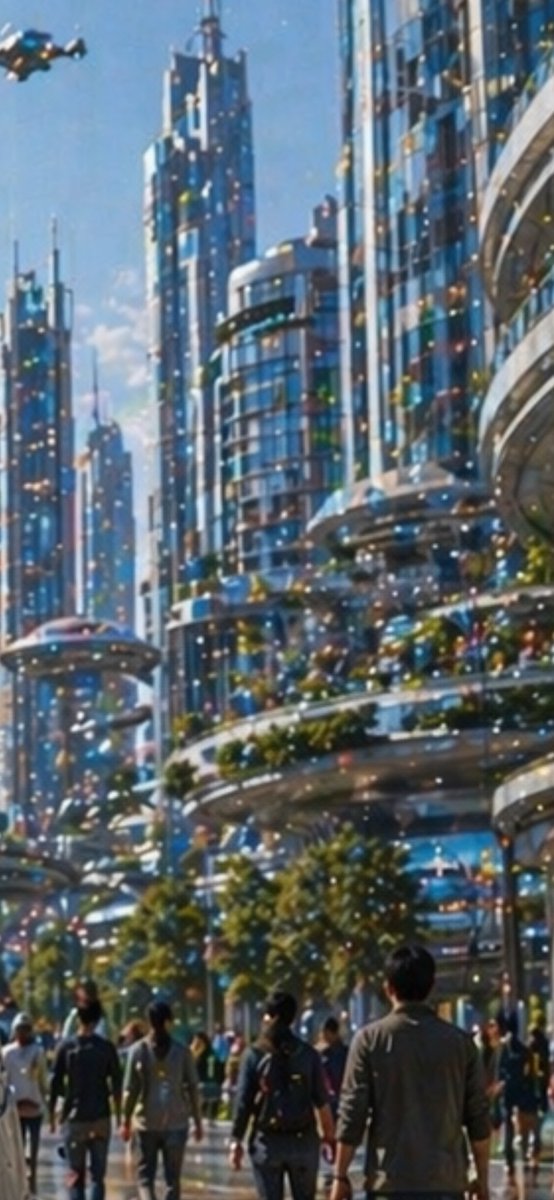
Visual Effects
Create a tall vertical cinematic sci-fi city scene in bright daytime, showing a dense futuristic metropolis with towering blue-glass skyscrapers, rounded balconies, layered skybridges, and lush greenery integrated into terraces. The viewpoint is from street level looking upward through a pedestrian boulevard, emphasizing immense scale and depth. Include exactly 6 dominant high-rise towers: three slim spired towers on the left and center, one cylindrical glass tower in the middle, and two massive curved glass-and-metal buildings on the right. Add elevated circular transit platforms and sweeping walkways between buildings, with warm glowing windows and many tiny multicolored light specks across the architecture. In the foreground, show exactly 9 prominent pedestrians walking away from the viewer, including a central person with a dark backpack, a tall man on the right in a gray jacket, two figures on the left in casual clothing, and five partially visible people scattered across the lower street; add a soft distant crowd behind them without individually defined faces. Include exactly 1 small flying vehicle in the upper-left sky and exactly 1 saucer-like elevated transit pod or platform on the left midground. Use {argument name="city style" default="utopian futuristic glass megacity"}, {argument name="time of day" default="clear sunny morning"}, {argument name="visual style" default="painterly cinematic concept art"}, {argument name="lighting mood" default="sparkling optimistic blue and gold light"}, and {argument name="foreground subject" default="pedestrians walking into the future"}. The image should feel like an aspirational future city, with soft atmospheric haze, reflective glass, saturated blue tones, warm highlights, shallow painterly detail, and no readable text, logos, or watermark.
This is a free AI prompt from the Orelon library. Thousands more image prompts here are free to copy and adapt.
Explore more image prompts


Ready to create
Start with this curated direction in Orelon, then shape it into your next visual.