Camera Control
Accidental Kitchen Candid Realism
Likes
2
Views
235
 Orelon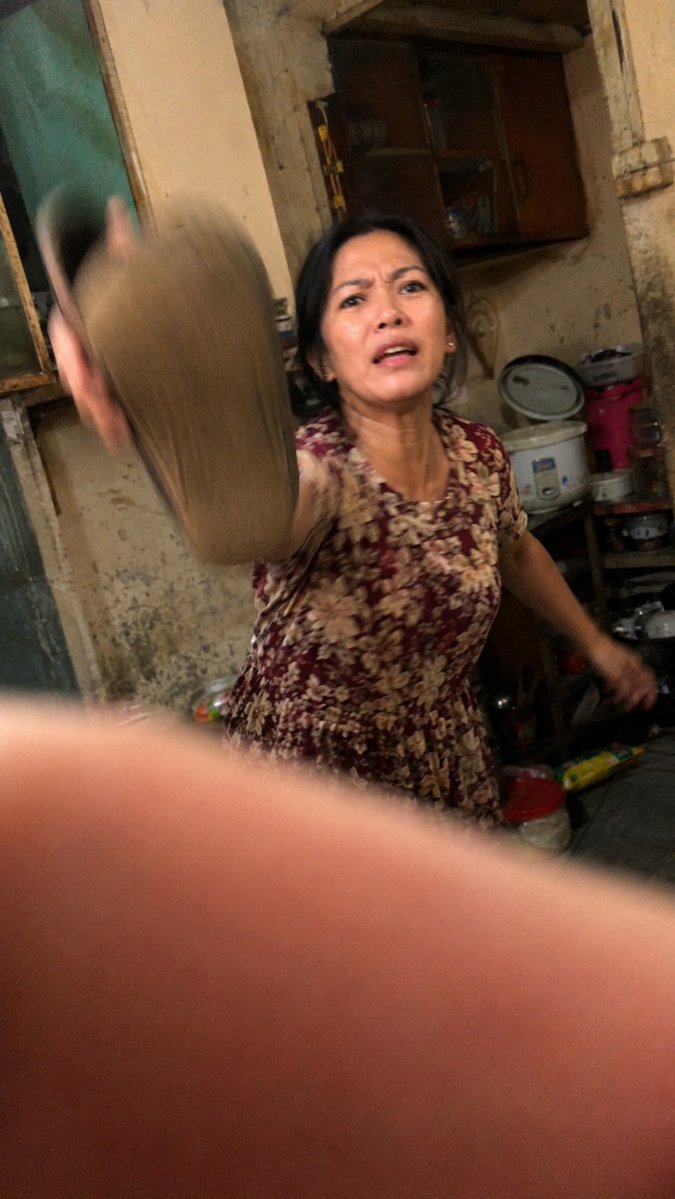
Camera Control
Create an ultra-realistic accidental candid photo shot on a low-end Android phone inside a cramped, old, messy kitchen at night. The image should feel like a badly timed snapshot: tilted framing, harsh warm indoor lighting, high ISO noise, compression artifacts, imperfect autofocus, motion blur, and a large out-of-focus finger partially covering the bottom half of the lens. In the center-right, show {argument name="subject" default="an older woman"} wearing {argument name="dress pattern" default="a burgundy floral short-sleeve house dress"}, caught mid-motion as she aggressively swings {argument name="object being swung" default="a slipper or sandal"} toward the camera; the swung object is very close to the lens on the left side and heavily motion-blurred. Her face is obscured by a plain rectangular blur/censor block, while her body remains visible. The background is a worn domestic kitchen with stained beige walls, peeling paint, a dark wooden wall cabinet, an old window or door frame on the left, a rice cooker, stacked pots, plastic containers, a red bucket, cluttered shelves, and scattered household items. Make the composition awkward and imperfect, as if the photographer panicked and accidentally captured the moment, with the camera slightly rotated, uneven exposure, soft focus, dirty textures, and raw documentary realism. Use vertical smartphone aspect ratio {argument name="aspect ratio" default="9:16"}.
This is a free AI prompt from the Orelon library. Thousands more image prompts here are free to copy and adapt.
Explore more image prompts


Ready to create
Start with this curated direction in Orelon, then shape it into your next visual.