Visual Effects
Neon Chibi Cyber Samurai Pixel Art
Likes
18
Views
1.8K
 Orelon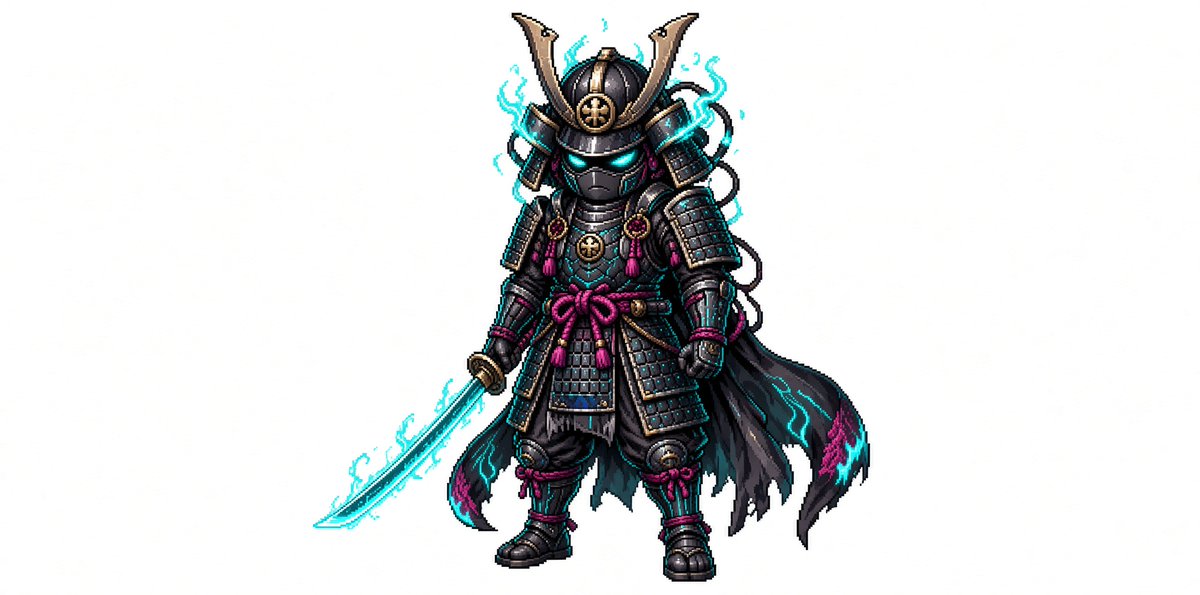
Visual Effects
Create a full-body chibi pixel art character on a plain white background: a tiny cyber-samurai warrior named {argument name="character name" default="neon shadow samurai"}, centered with lots of empty space around him. The character has a large helmeted head and small body proportions, wearing ornate black samurai armor with dark gunmetal plates, gold trim, and magenta cord knots. The helmet has a tall crescent-shaped golden maedate, side armor flaps, a circular gold crest on the forehead, and a black face mask with glowing cyan eyes. Add exactly one glowing katana held downward in the left hand, with a cyan energy blade and light electric aura. The armor includes layered shoulder guards, chest plates, skirt plates, shin guards, boots, gauntlets, braided cords, small tassels, and a magenta waist bow. Behind him is exactly one tattered black cloak flowing to the right, edged with cyan and magenta flame-like markings. Add cyan electrical wisps around the helmet, sword, shoulders, and cloak, but keep the silhouette readable. Style should be crisp retro game sprite art with detailed pixel shading, high contrast outlines, subtle dithering, and a fantasy RPG character-sheet feel. Use {argument name="armor color" default="black and gunmetal"} as the dominant armor palette, {argument name="accent color" default="cyan"} for all glow effects, and {argument name="secondary accent color" default="magenta"} for cords and decorative highlights. No text, no logo, no scenery, no shadow-heavy background, no extra characters.
This is a free AI prompt from the Orelon library. Thousands more image prompts here are free to copy and adapt.
Explore more image prompts


Ready to create
Start with this curated direction in Orelon, then shape it into your next visual.