Effects by Tags
Male Presenter Avatar Pose Sheet
Likes
3
Views
105
 Orelon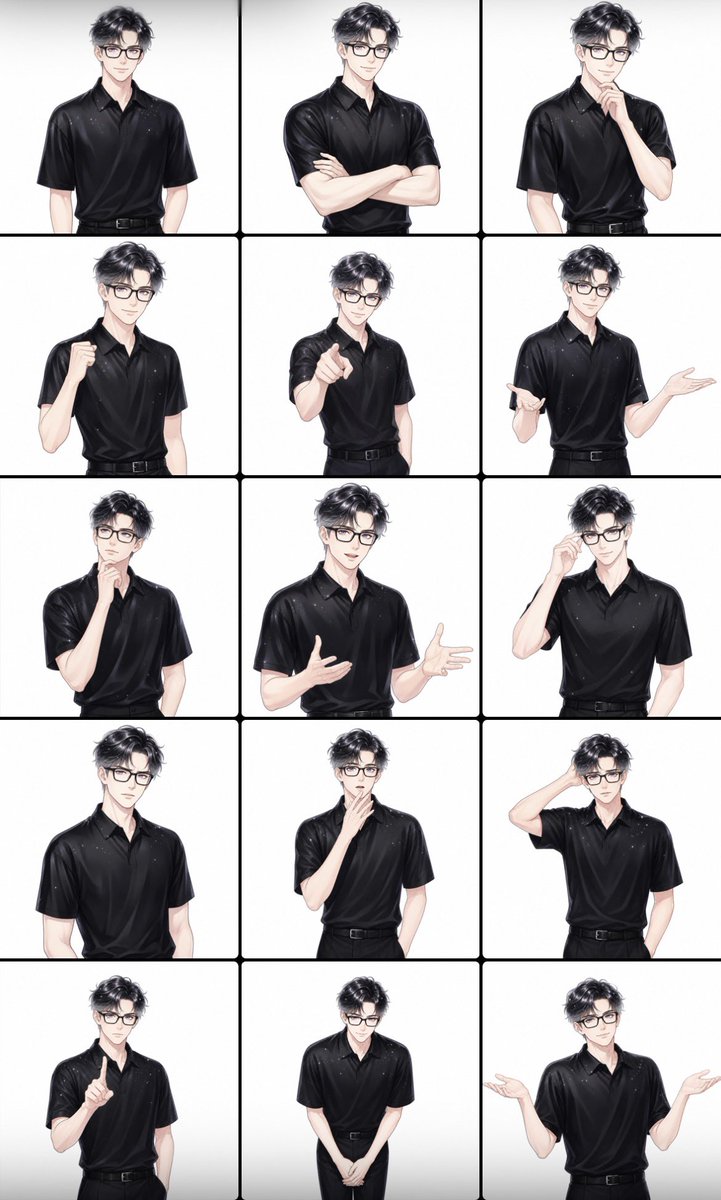
Effects by Tags
Goal: Create a clean character-pose reference sheet for a male presenter avatar, suitable for business explainer videos. Canvas: Vertical 2:3 image, white background, divided into a 3-column by 5-row grid with thick black rounded dividers, creating exactly 15 equal panels. Subject details: The same young adult man appears in every panel from the waist or upper thighs up. He has {argument name="hair color" default="dark charcoal black"} wavy, tousled medium-short hair with volume, pale skin, a slim build, and a neutral square blurred face with no visible facial features. He wears a glossy black short-sleeve polo shirt tucked into black trousers with a black belt. The style is polished semi-realistic anime illustration with soft shading, clean linework, subtle highlights on the black fabric, and a professional avatar-sheet look. Layout and pose count: Include exactly 15 distinct poses, one per panel, arranged left to right, top to bottom: 1. Standing neutrally with arms relaxed downward. 2. Arms crossed confidently across the chest. 3. Thinking pose, one hand touching the chin. 4. One fist raised near the chest as if motivated. 5. Pointing directly toward the viewer with one arm extended. 6. Explaining gesture with both hands open, one palm raised outward. 7. Thinking pose with fingers near the mouth. 8. Conversational pose with both hands mid-gesture, palms partly open. 9. Adjusting glasses or touching the side of the face with one hand, other hand down. 10. Neutral attentive stance with arms down. 11. Hand covering or touching the mouth in a reflective pose. 12. Scratching or holding the back of the head with one hand. 13. Raising one index finger as if making an important point. 14. Polite bowing posture, hands clasped in front. 15. Shrugging pose with both hands raised, palms up. Visual style: Bright white studio lighting, minimal shadows, high-key background, consistent character proportions across all panels, crisp black grid lines, no text, no logos, no watermark. Keep the face intentionally blurred as a soft square censor block in every panel.
This is a free AI prompt from the Orelon library. Thousands more image prompts here are free to copy and adapt.
Explore more image prompts





Ready to create
Start with this curated direction in Orelon, then shape it into your next visual.