Camera Control
Cinematic Action Scene: Explosion Behind High-Speed Car
Likes
1
Views
132
 Orelon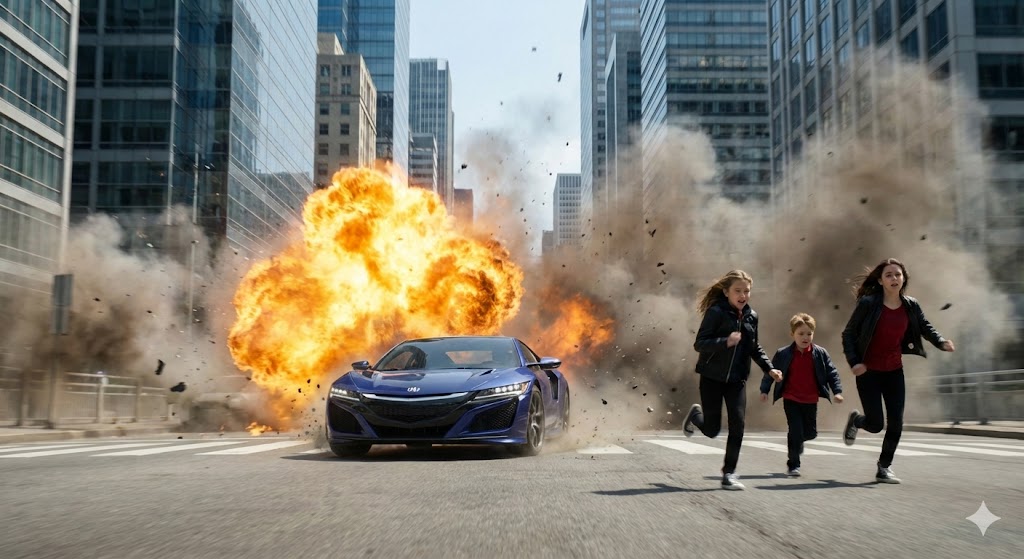
Camera Control
{ "main_action": { "event": "Large explosion occurring behind a moving car", "effects": { "fireball": "Bright orange-yellow explosion expanding outward", "smoke": "Thick grey and brown smoke billowing through the street", "debris": "Particles flying in the air due to blast pressure" } }, "subjects": [ { "type": "person", "count": 3, "position": "Right foreground, running away from explosion", "pose": "Full sprint, leaning forward", "appearance": { "gender_presentation": "2 female young adult, one younger male of about 5years old", "clothing": [ "Dark jacket", "Red top", "black long pants" ] } } ], "vehicles": [ { "type": "high-speed sports car", "position": "Center foreground, moving toward the camera", "direction": "Driving at high speed away from explosion", "appearance": "Futuristic or high-performance design, sleek aerodynamic curves" } ], "background_details": { "architecture": "Tall, modern skyscrapers lining both sides of the street", "street": "Wide avenue with pavement, dust, and scattered debris", "atmosphere": "Dust-filled air from explosion shockwave" }, "composition": { "camera_angle": "Low-angle shot, close to ground, slightly tilted forward", "framing": "Subjects and car moving toward viewer; explosion centered behind them", "focus": "Sharp focus on car and running individuals; background explosion slightly diffused by smoke", "motion": "Dynamic motion blur indicating fast movement and chaos" }, "technical_notes": { "intensity_level": "Very high", "resolution": "high (appears 4K+)", "style": "hyper-realistic digital rendering, cinematic photography", } }
This is a free AI prompt from the Orelon library. Thousands more image prompts here are free to copy and adapt.
Explore more image prompts





Ready to create
Start with this curated direction in Orelon, then shape it into your next visual.