Commercial
Luxury Korean Tasting Menu Editorial Layout Prompt
Likes
1
Views
93
 Orelon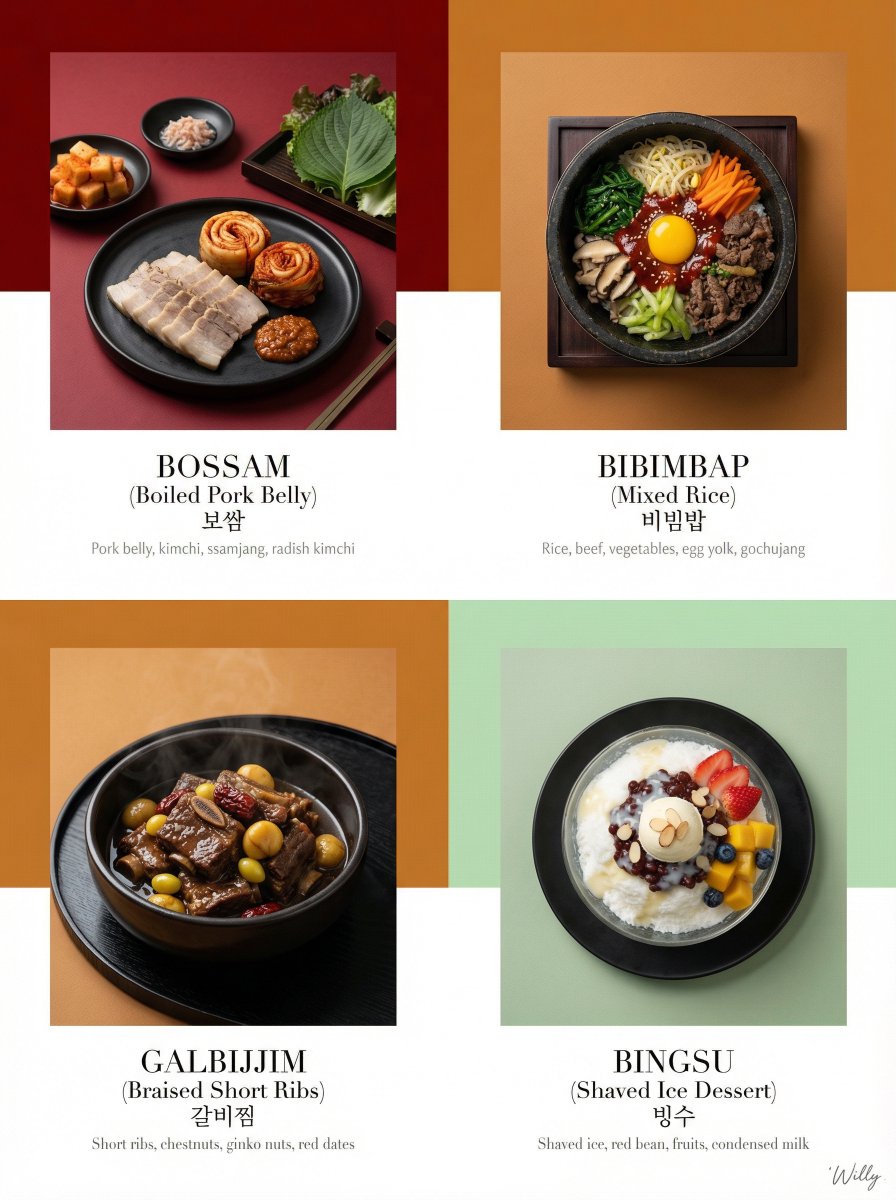
Commercial
Luxury Korean tasting menu, editorial layout, 2+2 large grid composition, 4:5 aspect ratio. LAYOUT: 2x2 large grid, with two hero images on top and two supporting images below, balanced asymmetric arrangement BACKGROUND: Tone-on-tone panels - alternating deep crimson (#800000), ochre (#CC7722), and celadon (#ACE1AF), creating warm yet appetizing rhythm PRODUCT EXPRESSION: Product only, overhead and 45-degree angles mixed, plated presentation on artisanal black ceramics and traditional Korean wooden trays TONE STRATEGY: Monochrome red/brown/green - Korean dish colors harmonize with background tones, seamless blend with pops of natural food color MAIN ELEMENTS: Hero Image 1 (top left): {argument name="hero dish 1" default="Bossam (boiled pork belly) plated with kimchi and ssamjang (fermented soybean paste)"} Hero Image 2 (top right): {argument name="hero dish 2" default="Bibimbap (mixed rice with vegetables and beef) with gochujang (chili pepper paste), egg yolk, and sesame oil"} Supporting Image 1 (bottom left): Galbijjim (braised short ribs) in a dark glossy sauce with chestnuts and ginko nuts Supporting Image 2 (bottom right): Bingsu (shaved ice dessert) with red bean paste, condensed milk, and various fruits TYPOGRAPHY: Bilingual - English names in elegant light serif (Didot), Hangul below in clean sans-serif, small ingredient descriptions in light gray CAMERA: Canon EOS R5, 100mm Macro for details, 50mm for full plates, soft diffused overhead lighting, butterfly lighting STYLE: Minimal + Luxury hybrid - generous whitespace, refined typography, Korean dish colors as only color source, shot by Annie Leibovitz Style keywords: fine dining menu, Korean editorial, monochrome harmony, quiet luxury, bilingual design.. A stylish handwritten signature Willy is elegantly and small letters placed at the Bottom Right corner.
This is a free AI prompt from the Orelon library. Thousands more image prompts here are free to copy and adapt.
Explore more image prompts




Ready to create
Start with this curated direction in Orelon, then shape it into your next visual.