Commercial
Japanese Skincare Ad Comparison
Likes
9
Views
2.6K
 Orelon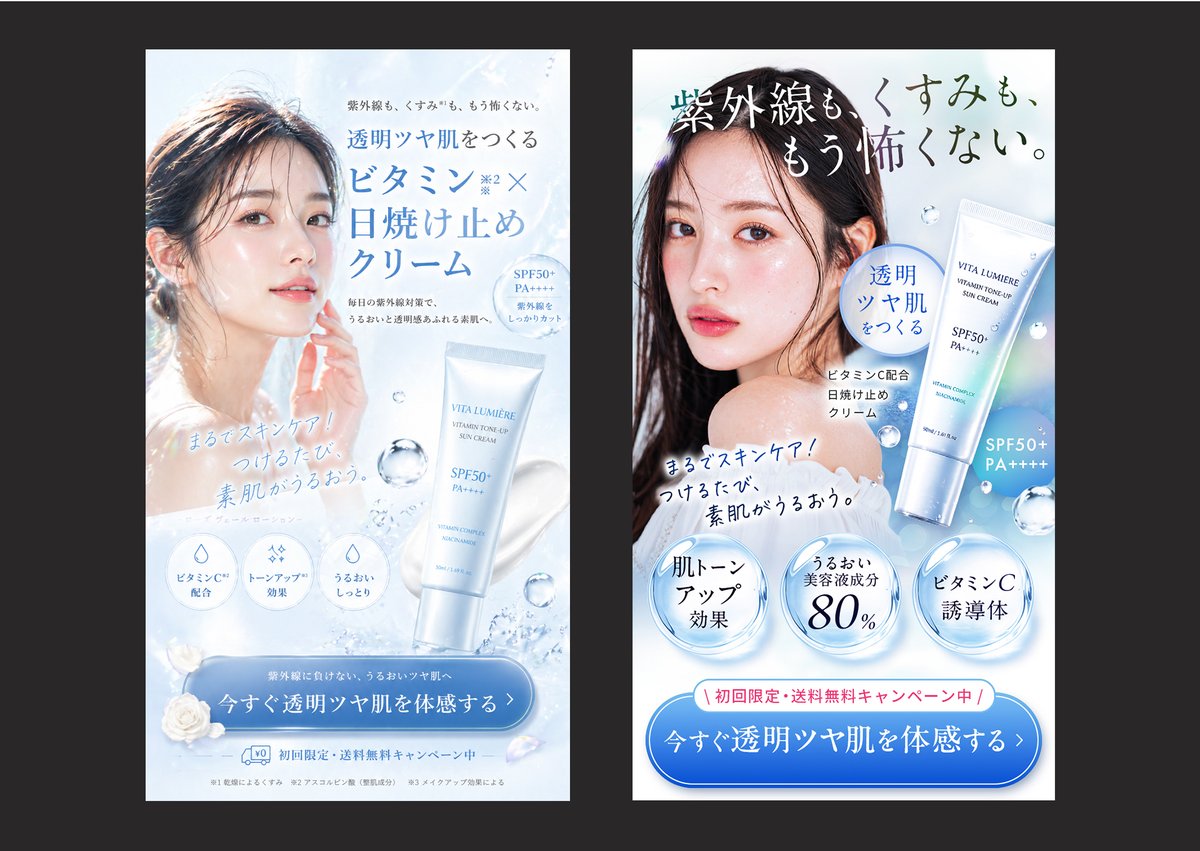
Commercial
Create a side-by-side comparison image showing 2 vertical Japanese skincare advertisement banners on a dark charcoal background, each banner framed as a clean smartphone-style ad mockup with a white and icy blue beauty aesthetic. The left banner should look elegant and visually polished but less sales-driven: a soft backlit close-up of a woman with wet-looking dark hair and luminous bare skin, her face partially obscured by a centered rectangular blur block, pale blue water textures, floating droplets, a white-and-silver sunscreen tube labeled {argument name="product name" default="VITA LUMIÈRE"} near the lower right, refined Japanese serif and sans-serif typography, and a large blue rounded CTA button at the bottom. Include the headline in Japanese: 「透明ツヤ肌をつくる ビタミンC×日焼け止めクリーム」, small supporting copy above and below, 3 circular benefit icons near the lower middle, the handwritten-style subcopy 「まるでスキンケア!つけるたび、素肌がうるおう。」, and a bottom CTA button reading 「今すぐ透明ツヤ肌を体感する」. The right banner should be a stronger direct-response version of the same product and model, with clearer hierarchy, bolder copy, and more persuasive conversion elements: a larger dramatic Japanese headline across the top reading 「紫外線も、くすみも、もう怖くない。」, the same model again with a centered rectangular blur over the face, the product tube shown larger on the right, a blue speech-bubble badge reading 「透明ツヤ肌をつくる」, the same handwritten-style subcopy angled across the chest area, 3 large glossy circular claim badges along the lower middle reading 「肌トーンアップ効果」, 「うるおい美容液成分80%」, and 「ビタミンC誘導体」, plus a pink campaign strip above the CTA reading 「初回限定・送料無料キャンペーン中」. The right CTA button should be larger and more prominent, reading 「今すぐ透明ツヤ肌を体感する」. Use a bright cool palette of white, ice blue, silver, and faint holographic highlights, realistic cosmetic product rendering, soft water splash accents, translucent bubbles, premium Japanese beauty-ad styling, high contrast between headline and CTA, and a clear visual impression that the right ad is more persuasive and conversion-optimized than the left.
This is a free AI prompt from the Orelon library. Thousands more image prompts here are free to copy and adapt.
Explore more image prompts




Ready to create
Start with this curated direction in Orelon, then shape it into your next visual.