Effects by Tags
Cyberpunk Anime Aquarium Portrait
Views
59
 Orelon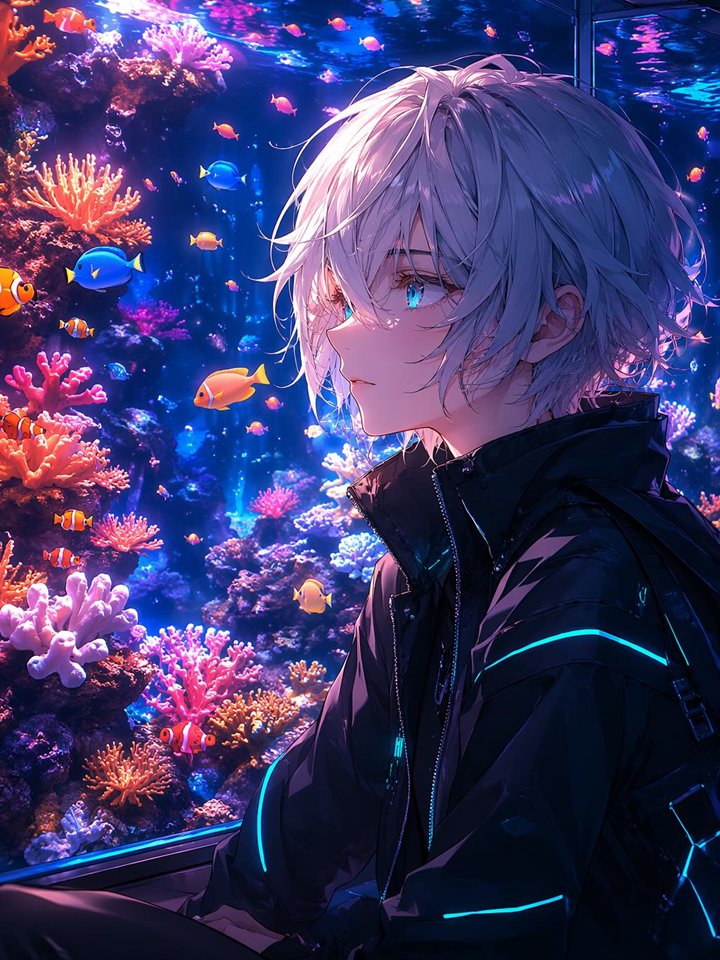
Effects by Tags
Create a vertical anime-style cyberpunk portrait set inside a glowing public aquarium, featuring {argument name="character description" default="a slim androgynous young man with messy silver-white layered hair"} seated in three-quarter profile facing right, with the face deliberately obscured by one large opaque muted lavender square centered over the head. The character wears {argument name="outfit" default="a glossy black high-collar futuristic jacket with zipper details, straps, and thin cyan neon light strips on the sleeves and back"}. Behind him is a floor-to-ceiling reef tank filled with saturated deep blue water, magenta and violet reflections, bright aquarium glass highlights, and dense coral scenery in pink, orange, red, lavender, and peach. Include exactly 22 visible fish: 5 orange-and-white clownfish clustered mostly along the left and lower-left reef, 2 bright blue tang fish on the left side, 1 larger orange fish near the center-left, 1 small yellow fish near the lower center, and 13 small pink-orange fish scattered across the upper and middle water. Include exactly 9 prominent coral clusters: 2 branching orange coral clusters on the left, 3 pink branching coral clusters along the lower half, 1 pale lavender coral cluster at the bottom-left, 1 glowing purple coral cluster near the top-left, 1 pale blue-white coral cluster behind the character, and 1 small orange coral cluster near the lower center. Use dramatic rim lighting from the aquarium, high contrast, luminous cyan and violet highlights on the jacket and hair, detailed strand-by-strand hair rendering, glossy glass reflections, rich saturated colors, cinematic depth, and an ultra-polished Japanese anime illustration style. Keep the composition portrait-oriented {argument name="aspect ratio" default="3:4"}, with the character occupying the right half and the reef tank filling the left and background. No text, no watermark, no photorealism.
This is a free AI prompt from the Orelon library. Thousands more image prompts here are free to copy and adapt.
Explore more image prompts





Ready to create
Start with this curated direction in Orelon, then shape it into your next visual.