Effects by Tags
Pixel Art Sprite Sheet from Cat Photo
Views
51
 Orelon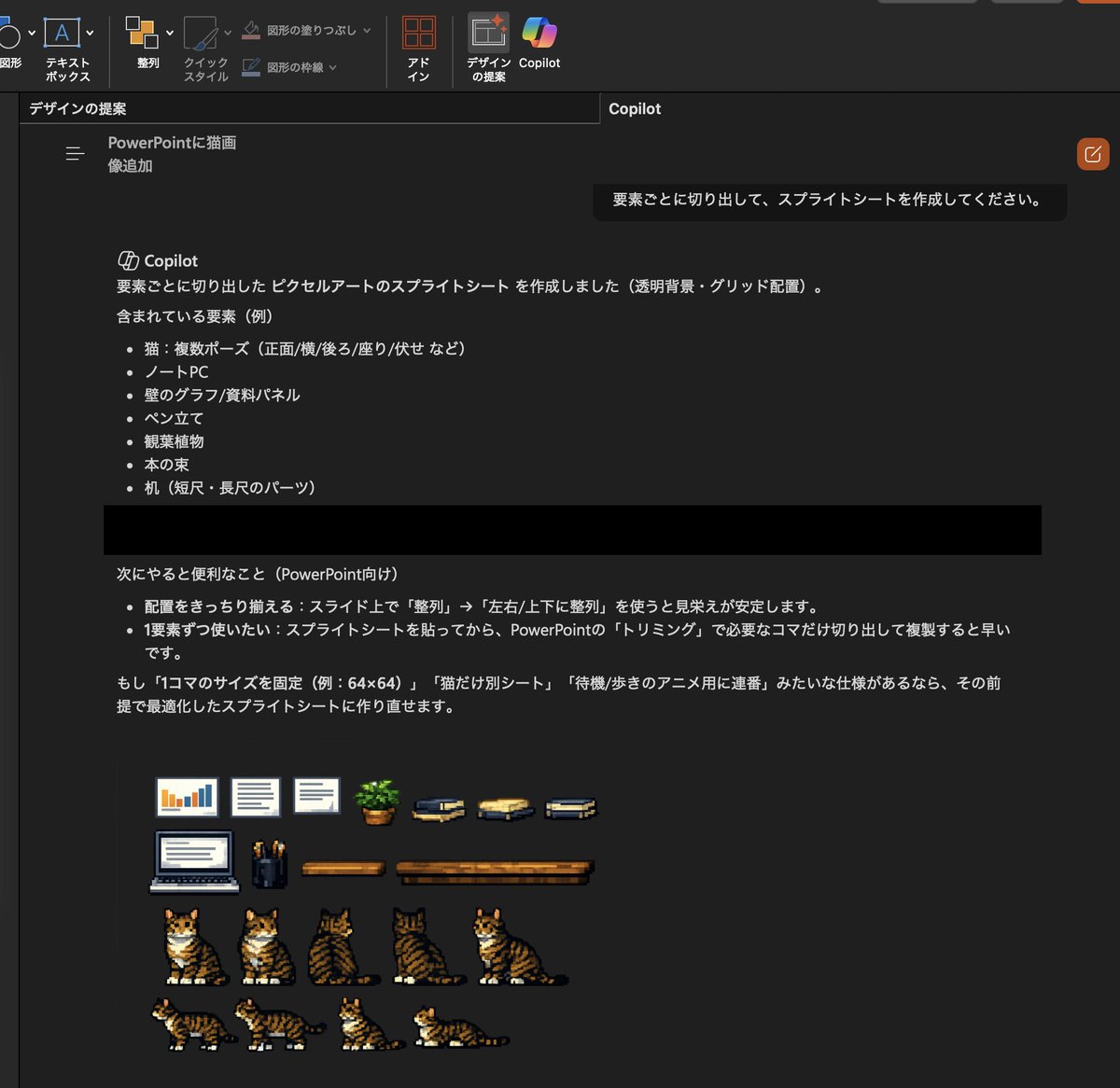
Effects by Tags
Using the provided reference image, turn the inserted realistic cat photo and the visible desk scene into a transparent-background pixel-art sprite sheet for PowerPoint. Extract the scene elements and redraw them as clean retro game-style assets arranged on a dark workspace in a tidy grid. Include exactly 7 cat sprites showing different views/poses from the reference cat: 1 sitting front-left, 1 sitting front, 1 sitting back view, 1 sitting side/back view, 1 sitting three-quarter view, 1 walking side view, and 1 lying down side view. Also include the surrounding props from the reference as separate pixel-art items: 1 laptop, 2 wall chart/document panels, 1 pen holder, 1 potted plant, 3 book stacks, and 2 desk pieces in different lengths. Keep the cat recognizable as the same tabby-and-white cat from the reference, but simplify everything into crisp low-resolution pixel art suitable for cutting out and reusing on slides.
This is a free AI prompt from the Orelon library. Thousands more image prompts here are free to copy and adapt.
Explore more image prompts





Ready to create
Start with this curated direction in Orelon, then shape it into your next visual.