Camera Control
Ultra-Realistic Portrait with Pose Variations
Likes
29
Views
2.6K
 Orelon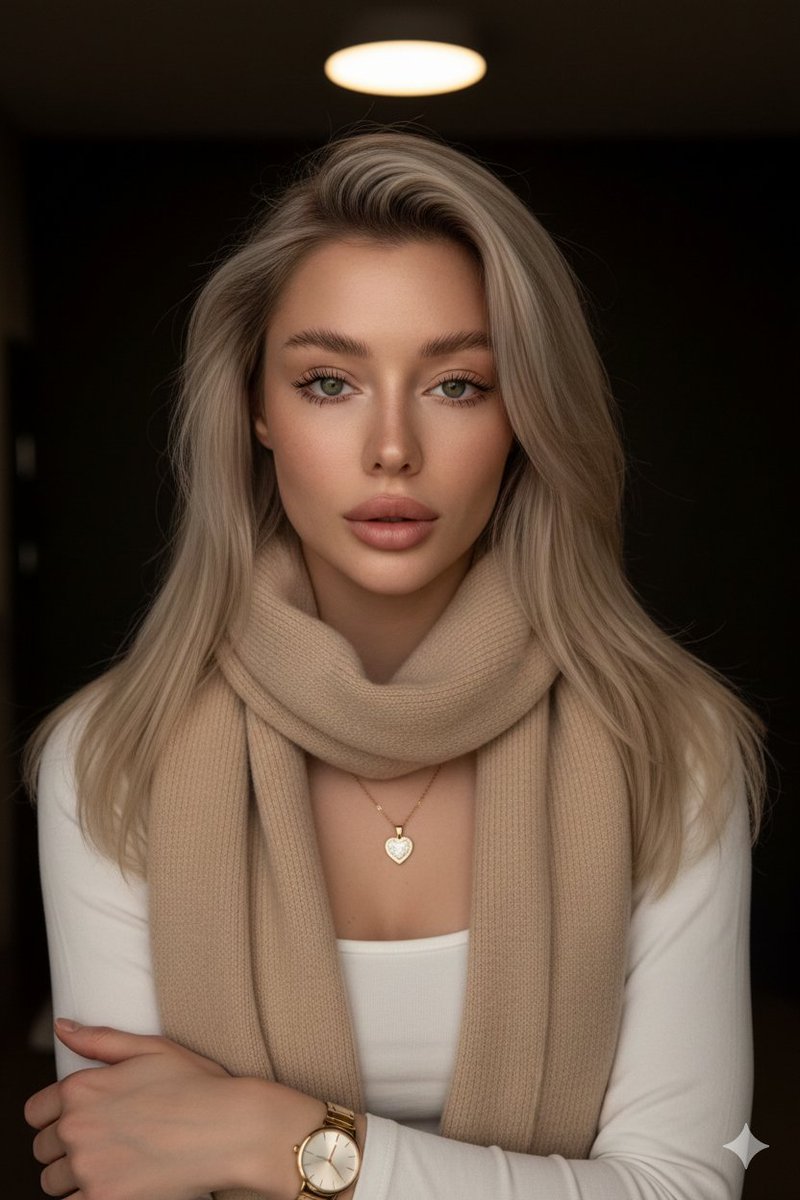
Camera Control
{ "project_metadata": { }, "base_prompt": { "subject": { "type": "young woman", "skin": "smooth, fair, subtle sheen", "hair": "long, silky blonde, neatly styled, color gradient", "eyes": "green, serene expression", "features": "full lips, unaltered", "makeup": "professional, soft" }, "attire": { "clothing": "{argument name="clothing item" default="beige scarf"}", "jewelry": [ "delicate gold necklace with small sparkling heart pendant", "elegant gold watch" ] }, "photography_specs": { "shot_type": "medium shot", "style": "ultra-realistic portrait", "lighting": "warm golden side-lighting, soft shadows", "background": "dark, indistinct, faint light circle at top", "keywords": [ "Professional photography", "serene beauty", "sophistication", "aesthetically pleasing" ] }, "negative_prompt": "Low quality, distortion, faded colors, blurry, cluttered background, noise, ugly, cartoonish" }, "variations": [ { "id": 1, "description": "Standard frontal serene portrait" }, { "id": 2, "action_phrase": "a side shot of her gently touching her hair", "focus": "pose adjustment" }, { "id": 3, "action_phrase": "a shot of her making a heart with her hands and winking", "focus": "expression and gesture" } ] }
This is a free AI prompt from the Orelon library. Thousands more image prompts here are free to copy and adapt.
Explore more image prompts





Ready to create
Start with this curated direction in Orelon, then shape it into your next visual.