UGC / Ad Templates
Stranger Things Inspired Cinematic Portrait
Likes
51
Views
1.3K
 Orelon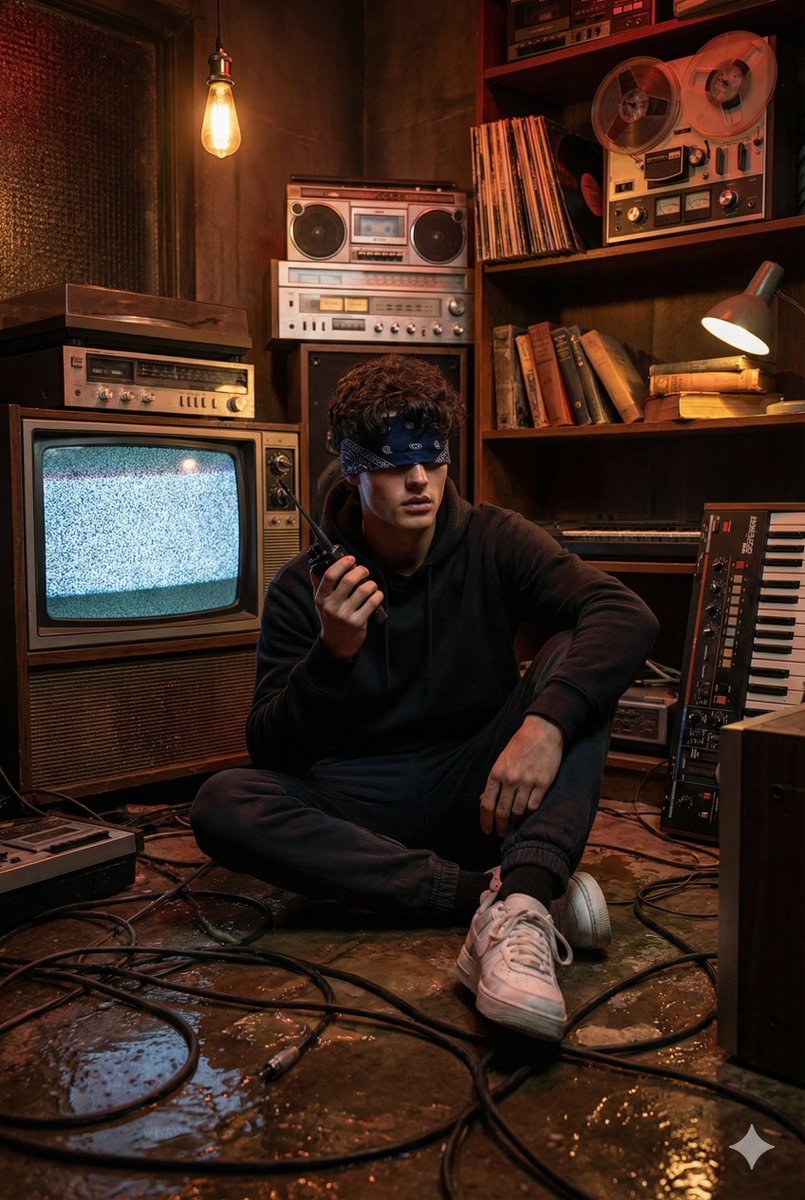
UGC / Ad Templates
{ "Objective": "Generate a cinematic, hyper-realistic, Stranger Things–inspired photo of a young man in a dark, retro tech-filled room.", "Identity_Safety": "Maintain facial features, hairstyle, and appearance consistent with the provided reference image, without distortions.", "Scene": { "Setting": "Dark, cramped room filled with old electronics and tangled wires, inspired by the 'Upside Down' aesthetic from Stranger Things.", "Environment_Details": { "Floor": { "Condition": "Wet, dirty, reflective", "Elements": "Thick dark cables, sticky textures" }, "Backdrop": { "TV": "Old convex tube TV showing static noise", "Shelf_Objects": [ "Retro audio equipment", "Vinyl records", "Reel-to-reel tape decks", "Worn books", "Keyboards and synthesizer-like gear" ] }, "Atmosphere": "Oppressive, mysterious, retro-chaotic" } }, "Character": { "Description": "Young man sitting on the floor in a trance-like state, similar to a Stranger Things psychic-ability moment.", "Identity": "Maintain facial features and hairstyle consistent with the reference image.", "Appearance": { "Hair": "Messy medium-length wavy hair", "Pose": "Sitting cross-legged on the wet floor", "Expression": "Focused, slightly tense, mouth slightly open", "Clothing": { "Top": "Gray hoodie", "Bottom": "Dark joggers", "Shoes": "White sneakers", "Accessories": "Dark blue patterned bandana covering eyes" }, "Props": { "Right_Hand": "Holding a walkie-talkie", "Left_Hand": "Resting on his knee" } } }, "Lighting_and_Color": { "Color_Palette": [ "Dark red", "Burgundy", "Dark brown", "Red-orange highlights" ], "Lighting": { "Sources": [ "Bare Edison bulb", "Weak desk lamp", "Glowing TV static" ], "Effects": [ "Low warm sinister lighting", "Soft red-orange reflections on wet floor", "Subtle static flicker on character's face" ] } } }
This is a free AI prompt from the Orelon library. Thousands more image prompts here are free to copy and adapt.
Explore more image prompts





Ready to create
Start with this curated direction in Orelon, then shape it into your next visual.