Camera Control
Prehistoric Redwood Jungle
Likes
2
Views
36
 Orelon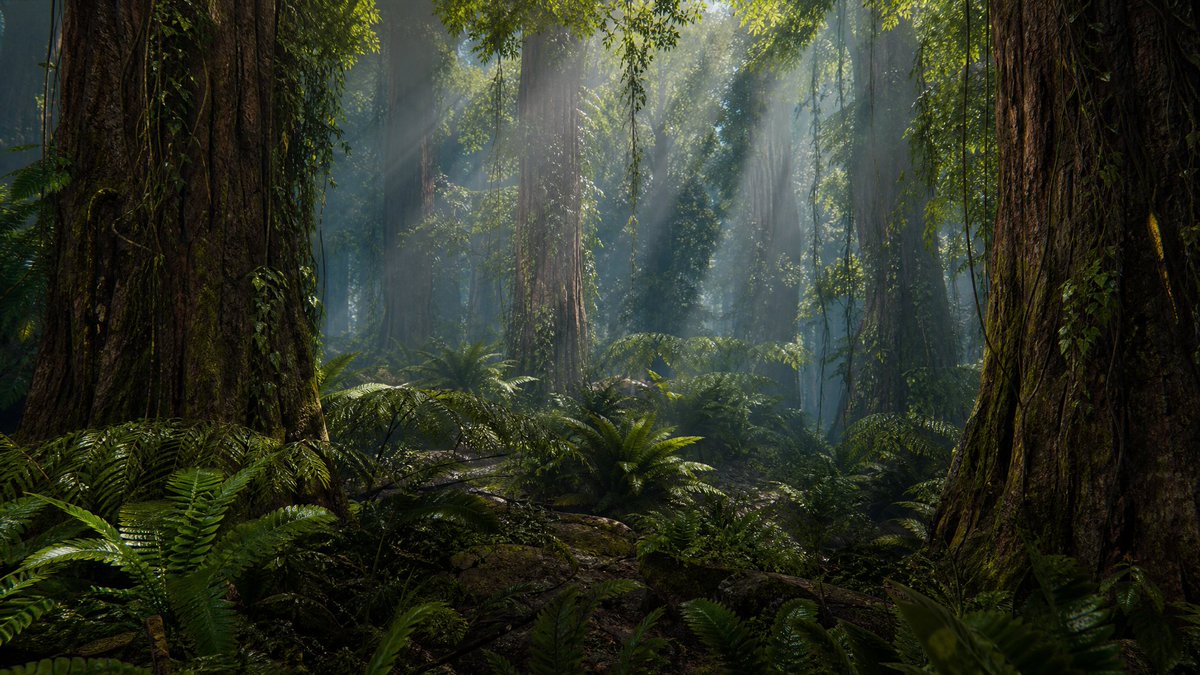
Camera Control
Create a hyper-realistic 3D CGI cinematic wide shot of a dense, humid {argument name="prehistoric jungle type" default="prehistoric redwood jungle"} at midday, with no animals or people visible. The composition is a 16:9 landscape view from the forest floor, framed by two enormous ancient redwood trunks in the extreme foreground, one on the left and one on the right, their bark deeply ridged, damp, mossy, and covered with creeping vines. Fill the midground and background with many towering vertical tree trunks fading into bluish atmospheric haze, thick hanging vines descending from the canopy, and lush prehistoric ferns covering the ground. Include exactly two dominant foreground tree trunks, numerous smaller background trunks, and dense layers of fern fronds, moss, roots, fallen branches, and wet dark soil. Sunlight breaks through the high green canopy as strong volumetric god rays angled downward through humid mist, illuminating floating moisture and patches of glossy foliage. Use {argument name="lighting mood" default="cool green-blue mist with warm midday sunbeams"}, deep shadows, high dynamic range, realistic subsurface leaf translucency, wet bark specular highlights, and a cinematic natural-history documentary look. Camera: low eye-level forest-floor perspective, wide-angle lens, deep environment depth with soft atmospheric perspective, ultra-detailed textures, photorealistic rendering, no text, no watermark, no buildings, no modern objects.
This is a free AI prompt from the Orelon library. Thousands more image prompts here are free to copy and adapt.
Explore more image prompts





Ready to create
Start with this curated direction in Orelon, then shape it into your next visual.