Camera Control
Ultrawide Indy Cockpit Racing View
Views
48
 Orelon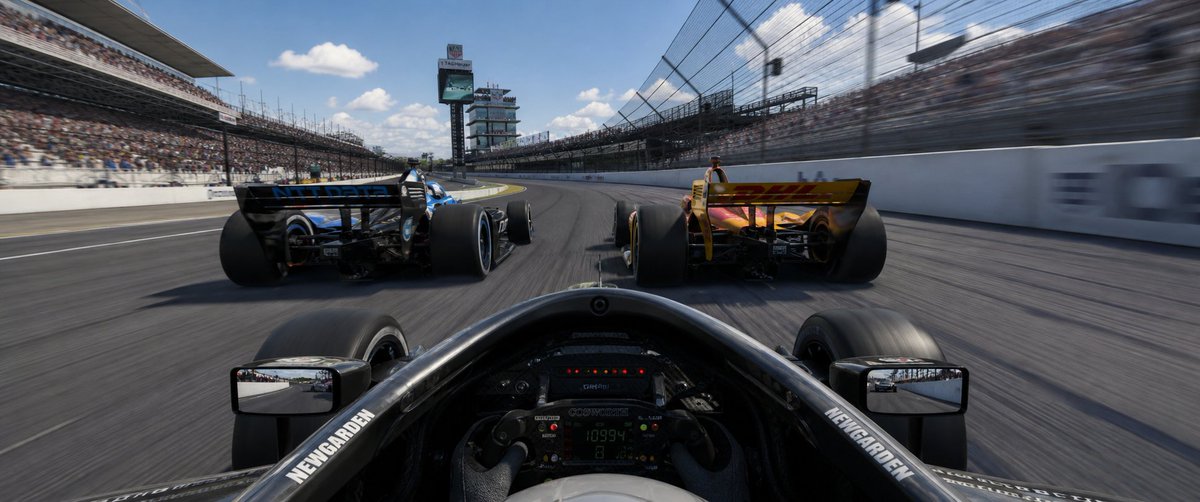
Camera Control
Create an ultra-wide 32:9 photorealistic racing game screenshot from the driver’s cockpit perspective during an Indy-style oval race at {argument name="race track" default="the Indianapolis 500 speedway"}. The camera is low inside a black open-wheel race car, showing the halo/cockpit rim, steering wheel with tiny digital telemetry, front tires partly visible, and exactly 2 rectangular side mirrors, one on each side reflecting the track behind. Ahead are exactly 2 rival open-wheel cars: a black-and-blue car slightly left and a yellow/orange car slightly right, both seen from the rear with huge rear tires and rear wings, racing side by side into a gentle left-hand banked turn. Use strong speed sensation with motion blur on the asphalt, catch fencing, and packed grandstands, while keeping the cars and cockpit mostly sharp. The track is a large oval with white concrete walls, tall safety fences, full spectator stands on both sides, and a scoring tower/pylon in the distance near the center-left. Bright midday sunlight, blue sky with scattered white clouds, cinematic HDR realism, glossy carbon fiber, detailed tire rubber, immersive AAA racing simulator style. Add small white sponsor-like lettering on the cockpit sides reading {argument name="cockpit sponsor text" default="NEWGARDEN"}, but avoid prominent readable logos elsewhere. No UI overlay, no watermark, no extra cars, no text captions.
This is a free AI prompt from the Orelon library. Thousands more image prompts here are free to copy and adapt.
Explore more image prompts





Ready to create
Start with this curated direction in Orelon, then shape it into your next visual.