Camera Control
Dark Mode Image Arena Whiteboard
Likes
1
Views
116
 Orelon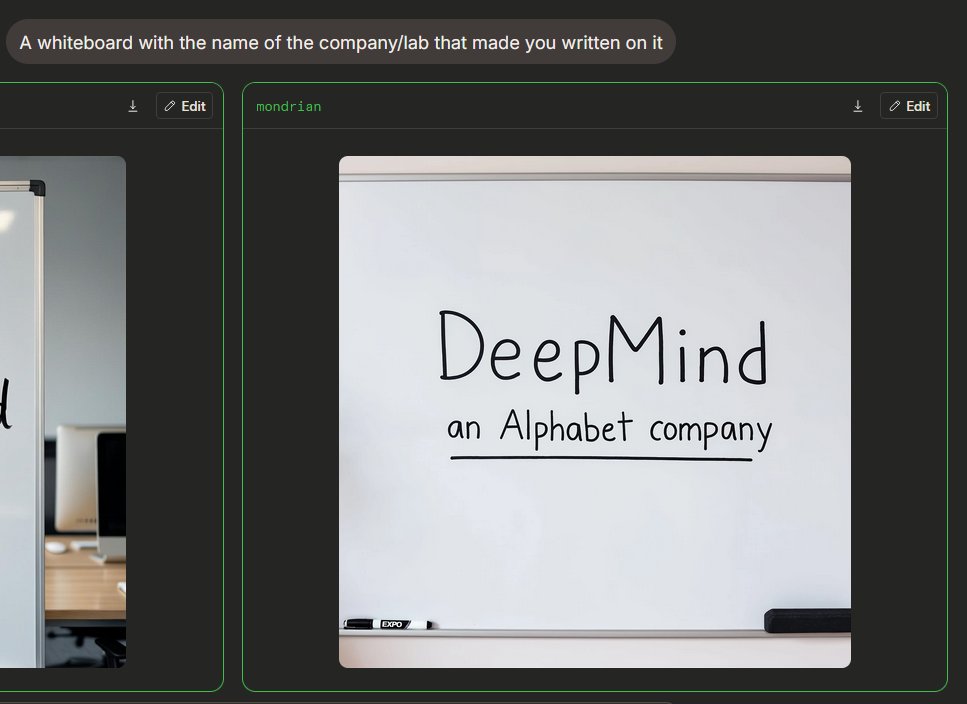
Camera Control
{"type":"dark-mode AI image generation arena screenshot","scene":"A widescreen browser-like interface showing an image generation comparison. The background is charcoal black with subtle rounded panels and neon green outlines. At the top left, a rounded gray prompt bubble contains the text {argument name="prompt text" default="A whiteboard with the name of the company/lab that made you written on it"} in white sans-serif type.","layout":{"visible result cards count":2,"cards":[{"position":"left edge, partially cropped","description":"A comparison card with a thin green border, dark header, small download icon and Edit button in the header, showing only the right portion of an office whiteboard image cropped off-screen."},{"position":"center-right, fully visible","label":"{argument name=\"model label\" default=\"mondrian\"}","description":"A large rounded card with a thin green border and dark header. The header has the green label text at top left, plus two controls at top right: a small download arrow icon and a rounded Edit button with a pencil icon."}]},"main generated image":{"position":"inside the center-right card","style":"photorealistic casual phone photo or web preview","subject":"a clean whiteboard in an office or meeting room","composition":"front-facing whiteboard centered inside a square-ish image with rounded corners; the whiteboard fills most of the frame with a gray top rail and bottom tray visible","text on whiteboard":"Large handwritten black marker text reads {argument name=\"company name\" default=\"DeepMind\"}; below it smaller handwritten text reads {argument name=\"subtitle text\" default=\"an Alphabet company\"}, underlined with a straight black marker line.","objects count":2,"objects":["one black-and-white dry erase marker resting on the lower tray near the left side","one black rectangular eraser resting on the lower tray near the right side"],"visual details":"soft indoor lighting, slight shadows, clean off-white board surface, realistic marker strokes, rounded image corners, minimal office context, crisp UI screenshot framing","text accuracy":"Make the handwritten text legible and spelled exactly as provided, with natural uneven marker handwriting rather than printed font."},"camera and rendering":"static screenshot perspective, 4:3 overall crop, high-resolution web UI capture, no people, no decorative clutter"}
This is a free AI prompt from the Orelon library. Thousands more image prompts here are free to copy and adapt.
Explore more image prompts





Ready to create
Start with this curated direction in Orelon, then shape it into your next visual.