Effects by Tags
Anime VTuber Gaming Thumbnail
Likes
1
Views
279
 Orelon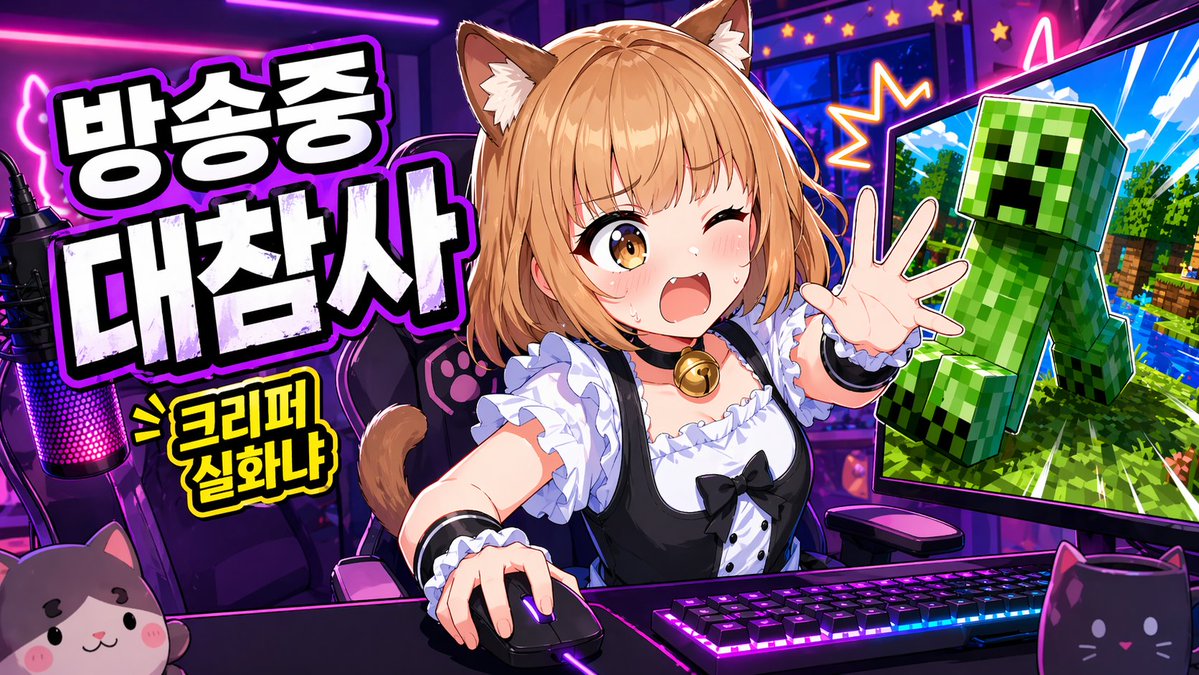
Effects by Tags
Create a vibrant anime-style YouTube thumbnail for a livestream gaming broadcast in a wide 16:9 layout. Set the scene inside a {argument name="room style" default="neon purple and pink"} streamer room. In the center, show a cute {argument name="character type" default="catgirl VTuber"} seated at a desk from the waist up, leaning forward with energetic body language, one hand on a computer mouse and the other hand reaching toward the viewer. Give her light orange-blonde bob-cut hair with soft bangs, fluffy brown-and-cream cat ears, and a visible cat tail. Cover the middle of her face with a solid rectangular censor block so her face is intentionally hidden. Dress her in a black-and-white maid-inspired outfit: a frilly white blouse, black dress bodice, puff sleeves, white ruffles, a black ribbon bow, and a gold bell choker. On the desk, include a mechanical keyboard with bright RGB lighting, a glowing gaming mouse, and a streamer microphone on the far left with pink-purple LED illumination. Add two cat-themed foreground props: a plush cat face at the bottom left and a black cat-shaped mug at the bottom right. Behind her, place a gaming chair decorated with paw-print details. On the left side of the thumbnail, add large bold Korean headline text in thick white block letters with black filled shadows and a glowing purple outline, stacked across two lines. The text should read: {argument name="korean text" default="방송중 대참사"}. Beneath it, add a smaller yellow comic-style burst caption with a black outline reading: > 크리퍼 실화냐. On the right side, place one large computer monitor angled inward. The screen should show a Minecraft-like scene with a bright blue sky, green trees, water, and a large green Creeper lunging outward toward the viewer. Outline the Creeper dramatically like a sticker cutout. Add starburst effects and neon accents around the monitor to make the moment feel chaotic and explosive. Use exaggerated clickworthy thumbnail aesthetics throughout: ultra-saturated colors, sharp cel shading, thick outlines, glossy highlights, high contrast, dynamic perspective, and a streamer-disaster mood designed to grab attention instantly.
This is a free AI prompt from the Orelon library. Thousands more image prompts here are free to copy and adapt.
Explore more image prompts





Ready to create
Start with this curated direction in Orelon, then shape it into your next visual.