Commercial
Cinematic Urban Rain Scene Prompt (Neo-Noir)
Likes
62
Views
834
 Orelon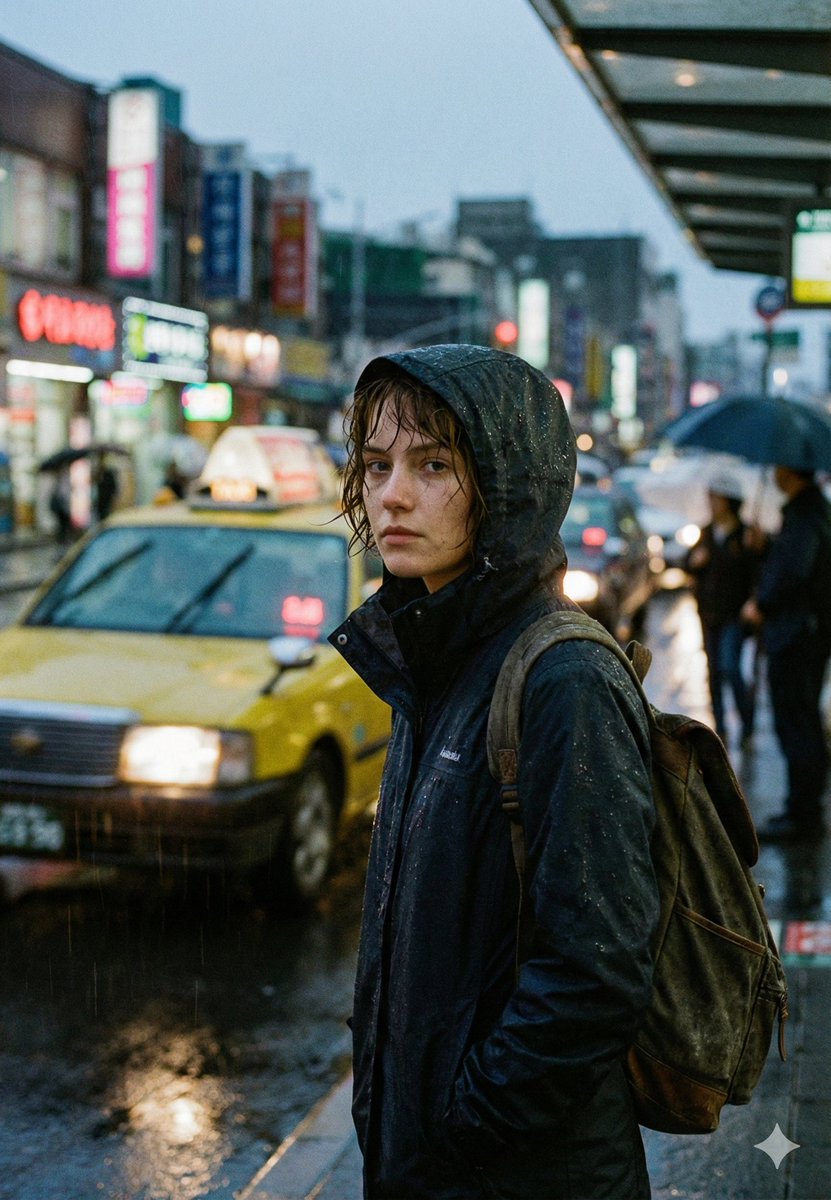
Commercial
{ "project_type": "cinematic_image", "title": "Rain Doesn’t Pause the City", "creative_direction": { "genre": "cinematic urban realism", "influences": [ "modern street photography", "neo-noir cinema", "documentary realism", "architectural urban mood" ], "emotion": [ "quiet loneliness", "introspection", "urban solitude", "calm under pressure" ] }, "scene": { "environment": "dense city street", "architecture": "mid-rise commercial buildings with neon signage", "time_of_day": "early evening, blue hour", "weather": { "type": "heavy rain", "details": "visible raindrops, wet surfaces, rain streaks in the air" }, "ground": "wet asphalt with reflective puddles" }, "subject": { "type": "single human subject", "description": "young woman standing alone on the sidewalk", "pose": "stationary, body angled slightly away from the camera, head turned toward lens", "expression": "neutral, distant, introspective", "wardrobe": { "outerwear": "dark hooded rain jacket", "accessories": ["backpack"], "condition": "rain-soaked fabric, visible droplets" }, "physical_details": { "hair": "wet, slightly messy, framing the face", "skin": "natural texture, no heavy retouching" } }, "background": { "elements": [ "yellow taxi with headlights on", "blurred moving traffic", "pedestrians holding umbrellas", "neon shop signs in multiple languages" ], "depth": "deep urban perspective with layered visual elements", "motion_effect": "subtle motion blur on vehicles and pedestrians" }, "cinematography": { "camera_type": "full-frame digital cinema camera", "lens": "35mm prime", "aperture": "wide open for shallow depth of field", "focus": "sharp focus on subject, background softly defocused", "camera_position": "eye-level, street perspective", "movement": "static frame, background motion creates contrast" }, "lighting": { "primary_source": "ambient city lighting", "secondary_sources": [ "vehicle headlights", "neon signs", "storefront lights" ], "lighting_style": "soft, diffused, natural", "contrast": "moderate, cinematic" }, "color_grading": { "palette": ["cool blues", "teal shadows", "warm amber highlights"], "saturation": "controlled, muted", "black_levels": "slightly lifted for filmic look", "highlights": "soft roll-off" }, "post_processing": { "film_grain": "subtle, cinematic", "sharpness": "subject emphasized, background softened", "noise": "minimal, natural", "vignette": "very subtle" }, "visual_style": { "realism": "high", "aesthetic": "moody, atmospheric, modern", "inspiration_keywords": [ "cinematic rain", "urban isolation", "street realism", "arch" ] } }
This is a free AI prompt from the Orelon library. Thousands more image prompts here are free to copy and adapt.
Explore more image prompts




Ready to create
Start with this curated direction in Orelon, then shape it into your next visual.