Camera Control
Travel Photo Monthly Calendar Card
Likes
2
Views
256
 Orelon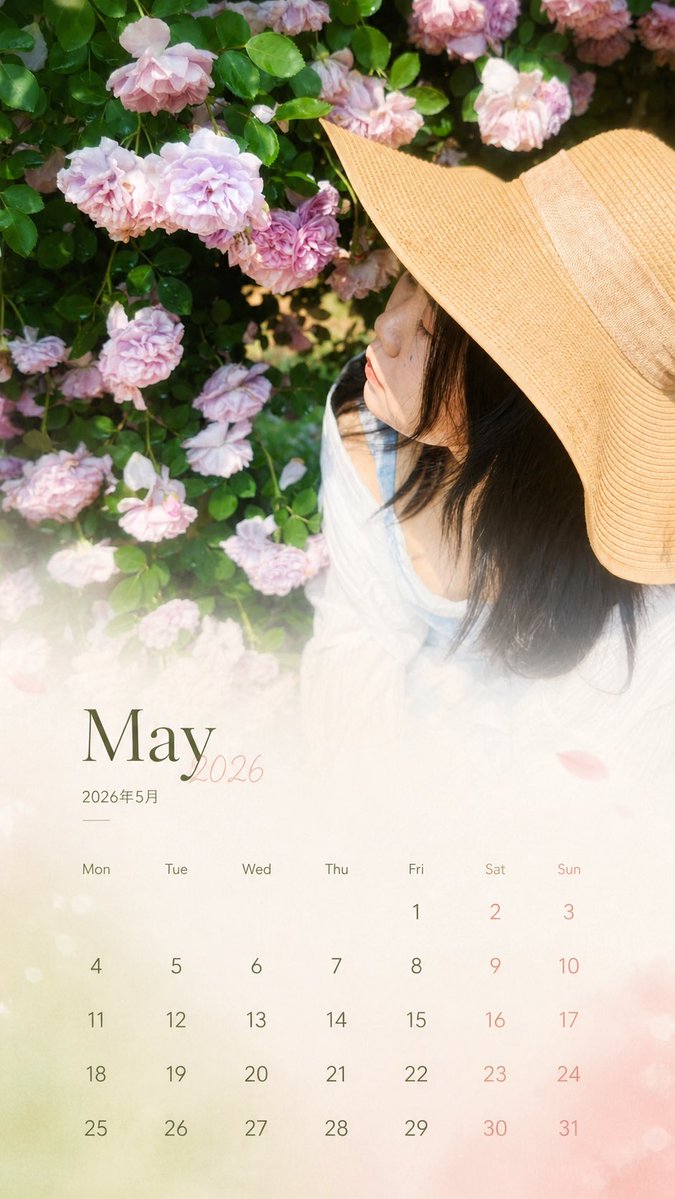
Camera Control
Based on the real travel photo I uploaded, generate a 9:16 aspect ratio 'Monthly Calendar Card'. [1. Execution Method (Most Important)] This is a photo editing task, not a regeneration. You must use the original photo as the base layer: - Keep the person's features, expression, hairstyle, and posture completely unchanged. - Preserve original lighting, color temperature, and shadow relationships. - No skin smoothing, brightening, repainting, or stylization. - Do not change environment, composition, or color atmosphere. - The original photo must look untouched. [2. Permitted Operations (Overlay Only)] Only design layers may be added over the original photo: - Gradient extension on the bottom 30% (for the calendar). - Soft translucent mask (to ensure text readability). - Calendar layout + Month Title + Copywriting. Prohibited: Repainting subject/background, changing overall tone, or applying design filters. [3. Color Rules] Colors must be extracted from the current image (main/secondary/accent colors). Only slight desaturation and brightness unification allowed. Maintain authentic color feel. [4. Layout Structure] Top 70%: Original photo (untouched). Bottom 30%: Gradient + Calendar area (natural transition). Must look like a magazine page, not a template calendar. [5. Calendar Content] Automatically generate the corresponding year and month: - Title: {argument name="date title" default="July 2026 / 2026.07"} - Days: Mon Tue Wed Thu Fri Sat Sun - Dates: Arranged according to a real calendar, strictly aligned. [6. Copywriting Rules] Length: 8-16 characters. Max two lines. No exclamation marks. No clichés or life lessons. Use emotional fragments or atmospheric sentences. [7. Selection Advice] Prefer side profiles, tilted heads, or dynamic movements over close-up front-facing portraits to reduce AI facial distortion risk. Final Core Rule: Do not make a 'better' photo; lightly place a design layer over the existing one.
This is a free AI prompt from the Orelon library. Thousands more image prompts here are free to copy and adapt.
Explore more image prompts





Ready to create
Start with this curated direction in Orelon, then shape it into your next visual.