Commercial
Herbal Chicken Soup Label Transformation
Likes
1
Views
230
 Orelon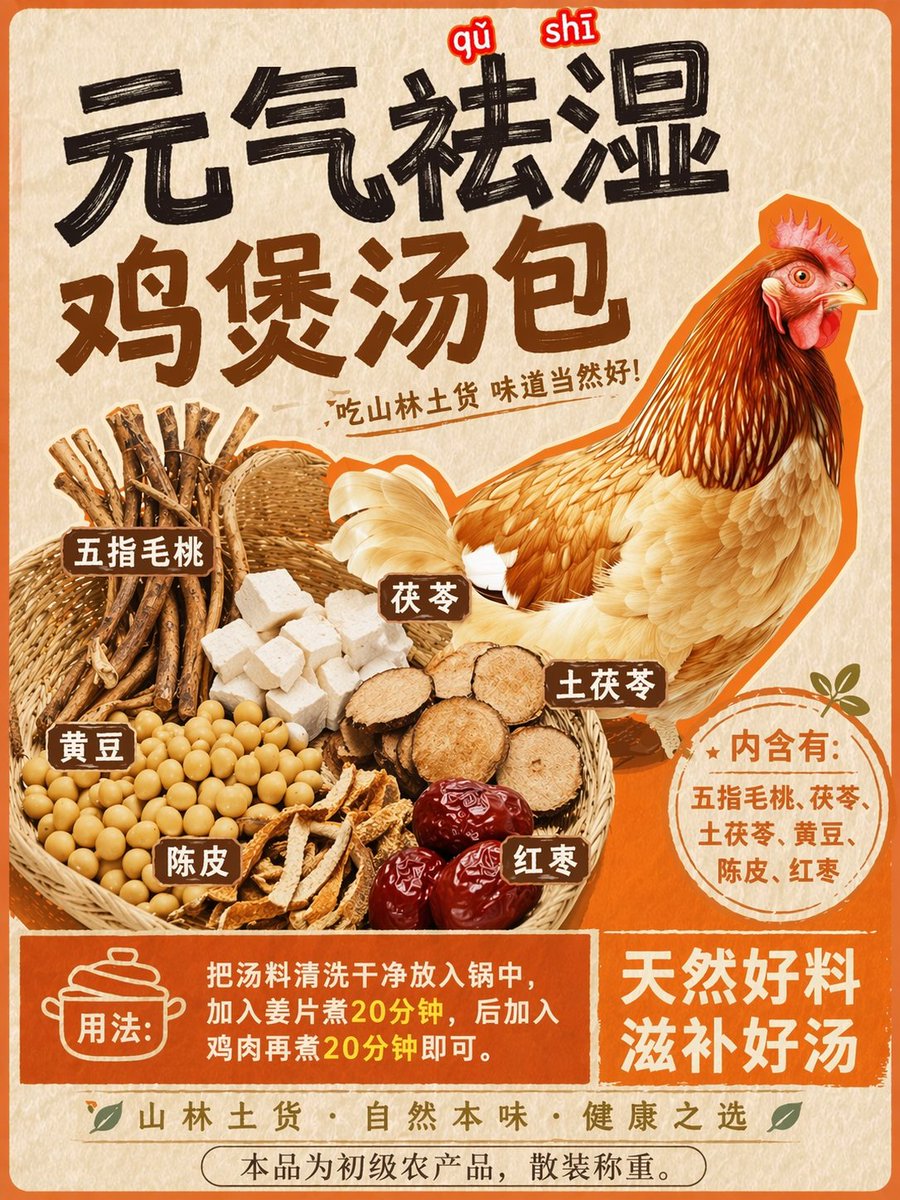
Commercial
Using REFERENCE_0 as the base style and preserving the central chicken illustration, transform the image into a product packaging label for a herbal soup mix. Shift the chicken to the right side. Replace the top text with a large, bold black brush-stroke headline {argument name="main headline" default="元气祛湿 鸡煲汤包"} and a smaller subtitle {argument name="subtitle" default="吃山林土货 味道当然好!"}. On the left side, add a new woven basket containing exactly 6 distinct piles of ingredients: woody root sticks, white square cubes, round sliced brown roots, yellow soybeans, dried orange peel strips, and dark red dates. Attach 6 small brown rectangular labels with white text to these ingredients. Below the chicken, add a circular orange badge containing the text {argument name="ingredients list" default="内含有:五指毛桃、茯苓、土茯苓、黄豆、陈皮、红枣"}. At the bottom, create a solid orange rectangular banner featuring a cooking pot icon, the text {argument name="usage instructions" default="用法:把汤料清洗干净放入锅中,加入姜片煮20分钟,后加入鸡肉再煮20分钟即可。"}, and a secondary slogan {argument name="bottom slogan" default="天然好料 滋补好汤"}.
This is a free AI prompt from the Orelon library. Thousands more image prompts here are free to copy and adapt.
Explore more image prompts


Ready to create
Start with this curated direction in Orelon, then shape it into your next visual.