Camera Control
Photorealistic Boeing 747 Cockpit
Likes
1
Views
99
 Orelon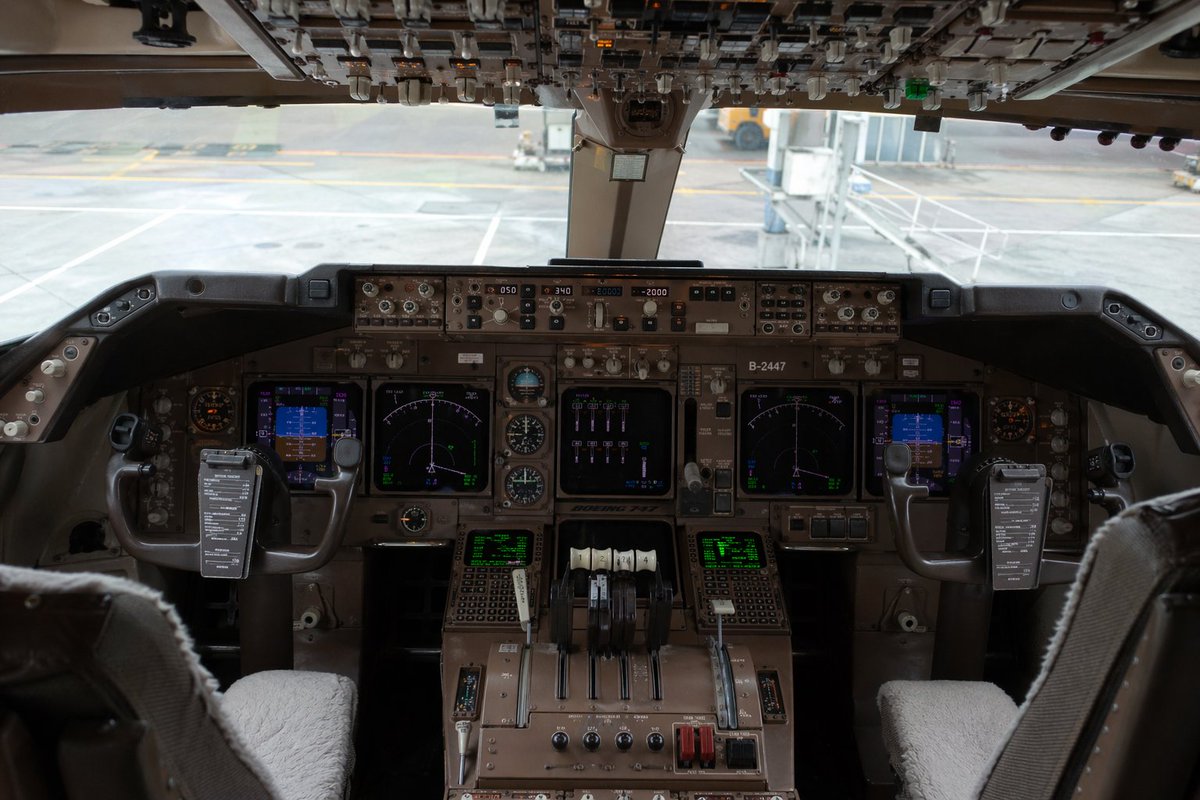
Camera Control
Ultra-realistic interior photograph of a {argument name="aircraft model" default="Boeing 747"} cockpit viewed from slightly behind and between the two pilot seats, centered and perfectly symmetrical, showing the full main instrument panel, center pedestal, dual control yokes, and the overhead switch panel across the top edge of the frame. The cockpit is unoccupied, with 2 pilot seats visible in the foreground, each with light gray or off-white sheepskin seat covers, and 2 control yokes each holding a dark rectangular checklist or electronic note board clipped to the center. The main panel is densely packed with authentic-looking avionics, analog dials, autopilot controls, radio panels, and 6 illuminated display screens total: 2 large central navigation displays, 2 smaller blue-toned flight displays near the left and right sides, and 2 green text/data screens on the lower center pedestal. Include 4 throttle levers in the center, plus additional flap and systems levers, rotary knobs, guarded switches, and weathered brown-gray metal surfaces typical of a widebody airliner cockpit. The overhead panel should be crowded with rows of switches, toggles, and indicator lights, partially shadowed but sharply detailed. Through the front cockpit windows, show an airport gate scene in soft focus with pale concrete tarmac, painted ground markings, and a passenger jet bridge connected or positioned near the aircraft. Lighting is natural daylight from outside, subdued inside the cockpit, with realistic shadows, mild reflections on glass screens, and documentary-style photographic color grading. Emphasize extreme detail, realism, authentic aviation engineering complexity, and a near indistinguishable-from-real photo quality. Shot with a full-frame camera, eye-level perspective, wide lens around 24–28mm, deep focus across the instrument panel, high dynamic range, no people, no dramatic stylization, no illustration look.
This is a free AI prompt from the Orelon library. Thousands more image prompts here are free to copy and adapt.
Explore more image prompts





Ready to create
Start with this curated direction in Orelon, then shape it into your next visual.