Commercial
Three-View Character Turnaround
Views
122
 Orelon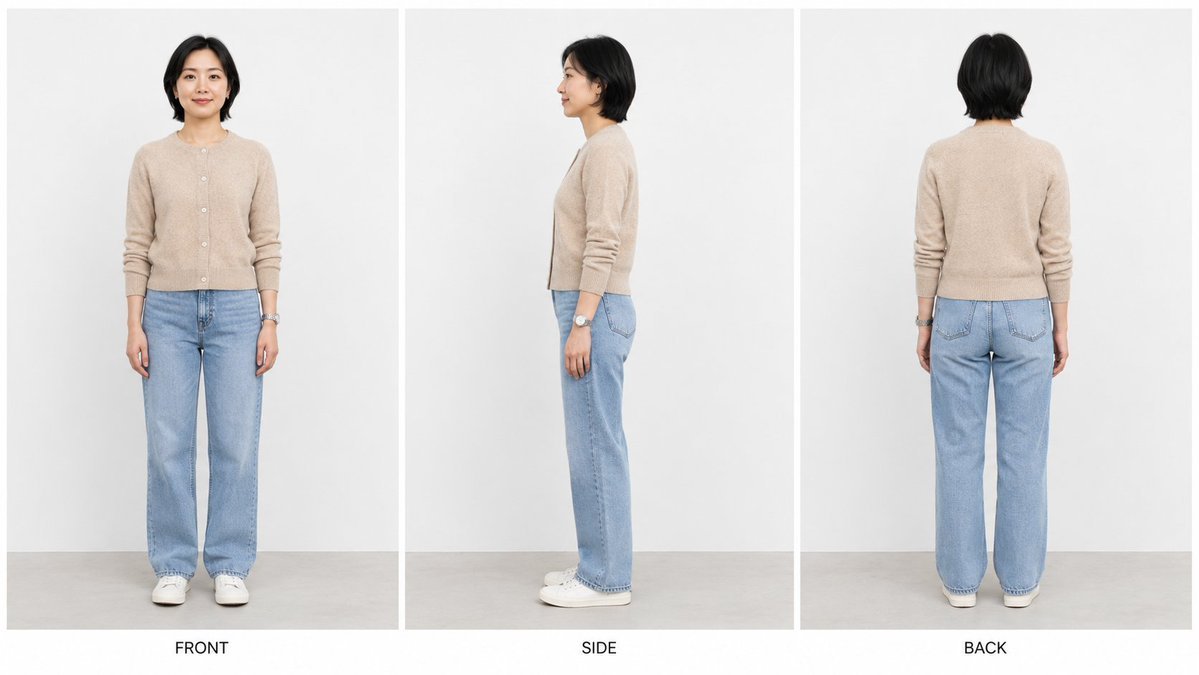
Commercial
Create a clean studio character turnaround reference sheet in a 16:9 widescreen canvas. Show exactly 3 vertical panels separated by thin white dividers: left panel labeled “FRONT”, center panel labeled “SIDE”, right panel labeled “BACK”. Each panel must depict the same {argument name="character description" default="28-year-old East Asian woman"} as a full-body realistic fashion photo, standing upright against a plain light gray-white studio wall with a pale gray floor. Keep her identity, body proportions, outfit, hair, and accessories consistent across all three views; only the camera angle changes. She has {argument name="hair style" default="short black bob-length hair, softly layered and tucked around the ears"}, a calm neutral expression when visible, and natural minimal makeup. Outfit: {argument name="top" default="beige knit button-front cardigan with long sleeves pushed slightly up"}, {argument name="pants" default="light blue straight-leg jeans"}, white low-top sneakers, and a silver wristwatch on her left wrist. Panel 1: front view, arms relaxed at sides, looking toward camera. Panel 2: true side profile view facing left, arms relaxed, the silver watch visible on the left wrist. Panel 3: back view, arms relaxed, cardigan back and jean pockets visible. Use soft even studio lighting, realistic proportions, crisp details, no extra props, no additional people, no watermark, and keep the three labels centered below their panels in simple black uppercase sans-serif text.
This is a free AI prompt from the Orelon library. Thousands more image prompts here are free to copy and adapt.
Explore more image prompts



Ready to create
Start with this curated direction in Orelon, then shape it into your next visual.