Commercial
Kinetic News Storyboard Sheet
Likes
1
Views
137
 Orelon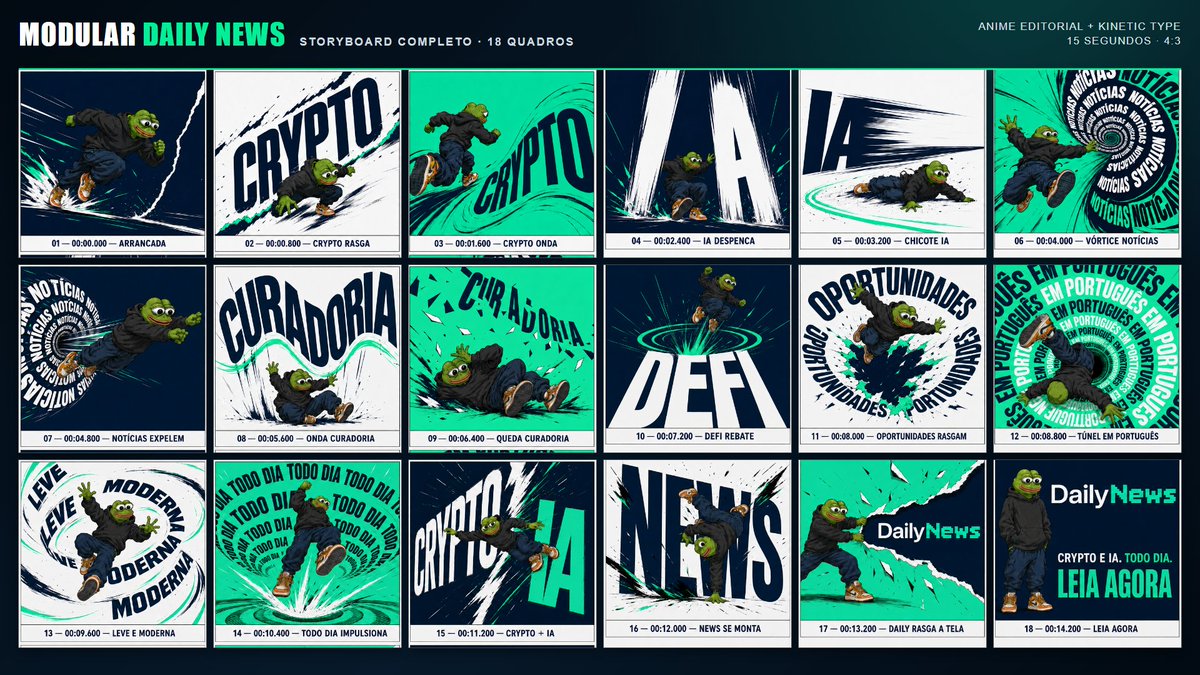
Commercial
Using REFERENCE_0 as the character base, create a complete anime-editorial kinetic-typography storyboard sheet for a {argument name="video duration" default="15 seconds"} 4:3 advertising video. Keep the Pepe character design, outfit, proportions, colors, streetwear styling, and energetic action poses consistent with the reference, but place him into a bold modular news-brand campaign layout. Goal: Design a dark navy presentation board titled {argument name="brand header" default="MODULAR DAILY NEWS"}, with the subtitle “STORYBOARD COMPLETO · 18 QUADROS” and a small top-right note “ANIME EDITORIAL + KINETIC TYPE / 15 SEGUNDOS · 4:3”. Use a high-contrast palette of deep navy, white, black ink strokes, and bright teal/green accents. Layout: Create exactly 18 storyboard panels arranged in a 3-row by 6-column grid. Each panel must have a thin border, dynamic manga/anime motion lines, ripped-paper or brush-stroke typography, and a small caption strip at the bottom with frame number, timestamp, and action label. Storyboard panels, exactly 18: 1. “01 — 00:00.000 — ARRANCADA”: Pepe sprinting forward through dark speed lines. 2. “02 — 00:00.800 — CRYPTO RASGA”: Pepe tearing through a huge diagonal “CRYPTO” word. 3. “03 — 00:01.600 — CRYPTO ONDA”: teal wave background with “CRYPTO” bending like a wave. 4. “04 — 00:02.400 — IA DESPENCA”: giant falling “IA” letters crashing downward. 5. “05 — 00:03.200 — CHICOTE IA”: Pepe low to the ground beside a sweeping “IA” motion whip. 6. “06 — 00:04.000 — VÓRTICE NOTÍCIAS”: Pepe falling into a circular vortex of repeated “NOTÍCIAS”. 7. “07 — 00:04.800 — NOTÍCIAS EXPELEM”: Pepe being launched from a “NOTÍCIAS” text spiral. 8. “08 — 00:05.600 — ONDA CURADORIA”: large warped “CURADORIA” text with Pepe under a teal wave. 9. “09 — 00:06.400 — QUEDA CURADORIA”: Pepe tumbling across a teal field with broken “CURADORIA” letters. 10. “10 — 00:07.200 — DEFI REBATE”: huge “DEFI” text, Pepe bouncing above teal rings. 11. “11 — 00:08.000 — OPORTUNIDADES RASGAM”: circular “OPORTUNIDADES” typography tearing open with Pepe bursting through. 12. “12 — 00:08.800 — TÚNEL EM PORTUGUÊS”: tunnel of repeated “EM PORTUGUÊS” text. 13. “13 — 00:09.600 — LEVE E MODERNA”: looping typography reading “LEVE” and “MODERNA” around Pepe. 14. “14 — 00:10.400 — TODO DIA IMPULSIONA”: Pepe launched upward inside repeated “TODO DIA” typography. 15. “15 — 00:11.200 — CRYPTO + IA”: split composition with “CRYPTO” and “IA” colliding. 16. “16 — 00:12.000 — NEWS SE MONTA”: Pepe hanging upside down among huge assembling “NEWS” letters. 17. “17 — 00:13.200 — DAILY RASGA A TELA”: Pepe tearing open a teal canvas revealing the DailyNews logo. 18. “18 — 00:14.200 — LEIA AGORA”: final call-to-action card with Pepe standing at left, the {argument name="logo text" default="DailyNews"} logo at top right, and the copy “CRYPTO E IA. TODO DIA.” plus the large CTA {argument name="call to action" default="LEIA AGORA"}. Style constraints: Make it look like a polished advertising storyboard, not a comic page; use cinematic frame composition, kinetic editorial lettering, bold perspective distortion, speed trails, ink splatters, teal highlight strokes, and clean production-board labeling. Do not add extra panels, extra characters, watermarks, or unrelated text.
This is a free AI prompt from the Orelon library. Thousands more image prompts here are free to copy and adapt.
Explore more image prompts




Ready to create
Start with this curated direction in Orelon, then shape it into your next visual.