Camera Control
Cinematic Stadium Location Board
Likes
1
Views
252
 Orelon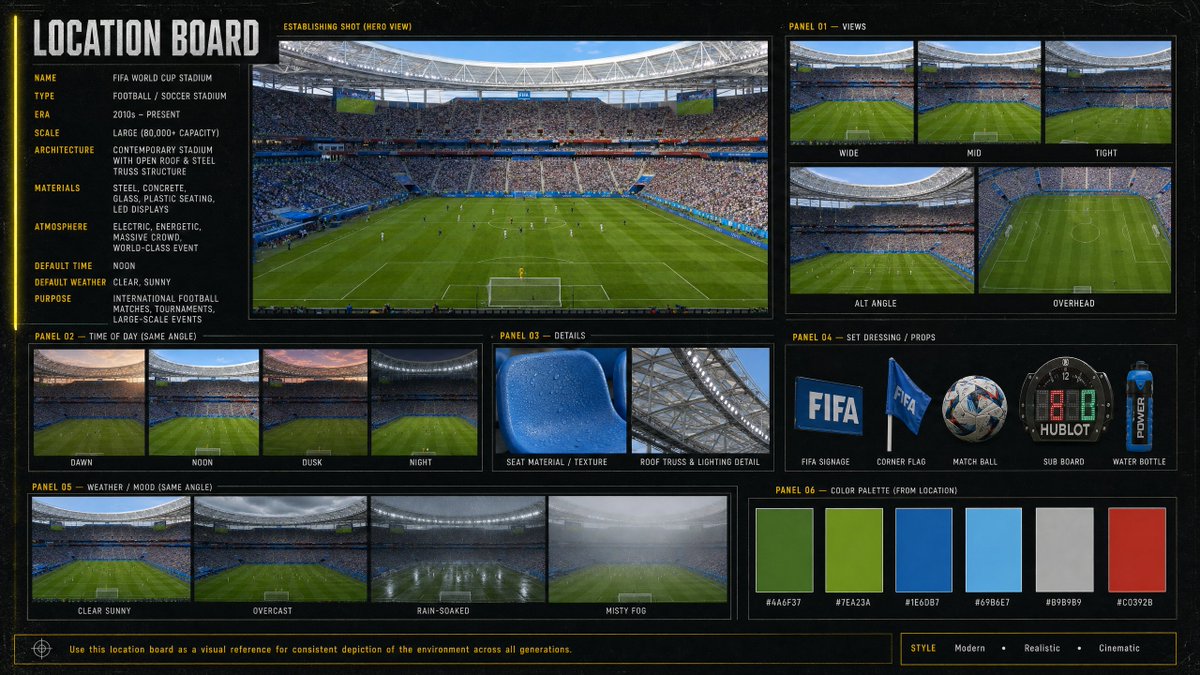
Camera Control
Goal: Create a cinematic, information-dense location board for a {argument name="venue name" default="FIFA World Cup Stadium"}, designed as a professional film/game environment reference sheet. Canvas: Wide 16:9 horizontal board with a dark charcoal/black textured background, thin yellow guide lines, subtle grid marks, and a modern sports-broadcast production design feel. Use crisp photo-realistic stadium imagery inside bordered panels, with condensed uppercase typography in white and yellow. Main title: Large vertical-left header reading “LOCATION BOARD”. Left information column: Include 10 labeled metadata rows: Name: {argument name="venue name" default="FIFA World Cup Stadium"}; Type: Football / Soccer Stadium; Era: 2010s – Present; Scale: Large (80,000+ capacity); Architecture: Contemporary stadium with open roof & steel truss structure; Materials: Steel, concrete, glass, plastic seating, LED displays; Atmosphere: Electric, energetic, massive crowd, world-class event; Default time: Noon; Default weather: Clear, sunny; Purpose: International football matches, tournaments, large-scale events. Central hero panel: One large establishing shot labeled “ESTABLISHING SHOT (HERO VIEW)”, showing a packed modern soccer stadium from behind one goal, lush green pitch, players tiny on the field, bright daylight, steel roof ring, giant screens, blue seating accents, and a dense crowd. Panel 01 — Views: Show exactly 5 view thumbnails labeled Wide, Mid, Tight, Alt Angle, and Overhead. Wide shows the full field and stands; Mid is closer to the pitch and crowd; Tight focuses more on field/crowd detail; Alt Angle is a diagonal stadium view; Overhead is a high top-down view of the pitch. Panel 02 — Time of Day (Same Angle): Show exactly 4 thumbnails labeled Dawn, Noon, Dusk, and Night, each using the same stadium angle with different lighting conditions. Panel 03 — Details: Show exactly 2 close-up detail images labeled Seat Material / Texture and Roof Truss & Lighting Detail. Seat material should be a blue plastic stadium seat with droplets/texture; roof detail should show steel trusses and stadium lighting. Panel 04 — Set Dressing / Props: Show exactly 5 isolated prop images labeled FIFA Signage, Corner Flag, Match Ball, Sub Board, and Water Bottle. Include a blue FIFA sign, a blue corner flag, a patterned soccer ball, a digital substitution board, and a blue sports water bottle. Panel 05 — Weather / Mood (Same Angle): Show exactly 4 thumbnails labeled Clear Sunny, Overcast, Rain-Soaked, and Misty Fog, all from the same stadium angle. Panel 06 — Color Palette (From Location): Show exactly 6 rectangular color swatches with hex labels: #4A6F37 deep field green, #7EA23A bright grass green, #1E6DB7 stadium blue, #69B6E7 sky blue, #B9B9B9 concrete gray, and #C0392B red accent. Footer: Add a thin boxed note reading “Use this location board as a visual reference for consistent depiction of the environment across all generations.” On the bottom right, add a style tag row reading “STYLE Modern • Realistic • Cinematic”. Visual style: Photorealistic sports venue imagery, high-detail architectural reference board, cinematic realism, clean grid layout, consistent panel borders, subtle grunge texture, yellow technical annotations, no people in close-up foreground except distant crowd and players. Keep all text legible and aligned.
This is a free AI prompt from the Orelon library. Thousands more image prompts here are free to copy and adapt.
Explore more image prompts





Ready to create
Start with this curated direction in Orelon, then shape it into your next visual.