Camera Control
Macro Japanese Beauty Portrait
Likes
2
Views
221
 Orelon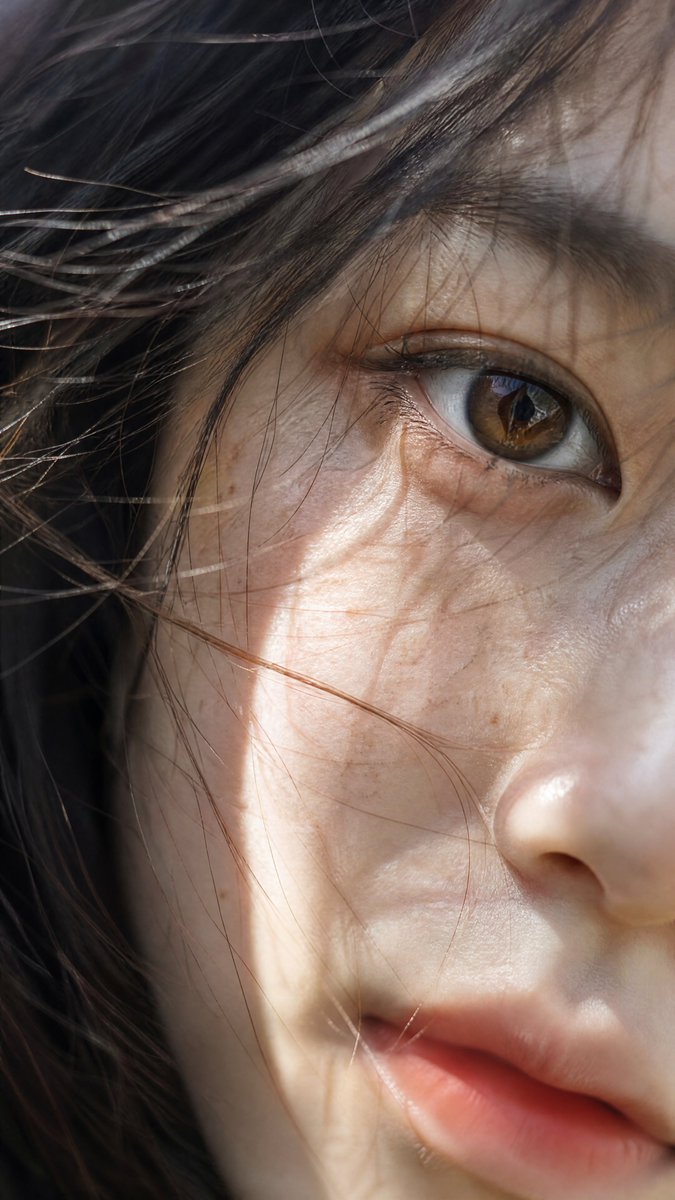
Camera Control
Using REFERENCE_0 as the visual base, extract only the portrait subject from the screenshot and regenerate it as a clean standalone photorealistic image with no interface, no text, no borders, and no watermark. Transform the portrait into an ultra-close macro beauty photograph of the same Asian woman, with the composition rotated slightly and pushed closer so the visible focus is one brown eye, part of the nose, cheek, and soft lips. Keep the natural windblown hair crossing the face, delicate skin texture, pores, fine facial hairs, subtle freckles, and realistic uneven sunlight-and-shadow pattern, but make the final image feel more like high-end Japanese art photography. Use shallow depth of field, strong natural sunlight, rich skin detail, authentic lens rendering, and a vertical mobile crop at {argument name="image size" default="900x1600"}. Camera feel: {argument name="lens" default="58mm prime lens"}, {argument name="aperture" default="f/1.4"}, Sony-style high-resolution realism. Subject style: {argument name="subject" default="a beautiful Asian woman with brown eyes"}. Lighting mood: {argument name="lighting" default="bright natural sunlight with dramatic shadows across the face"}.
This is a free AI prompt from the Orelon library. Thousands more image prompts here are free to copy and adapt.
Explore more image prompts





Ready to create
Start with this curated direction in Orelon, then shape it into your next visual.