Effects by Tags
Gothic Puppeteer and Spider Lilies
Likes
4
Views
64
 Orelon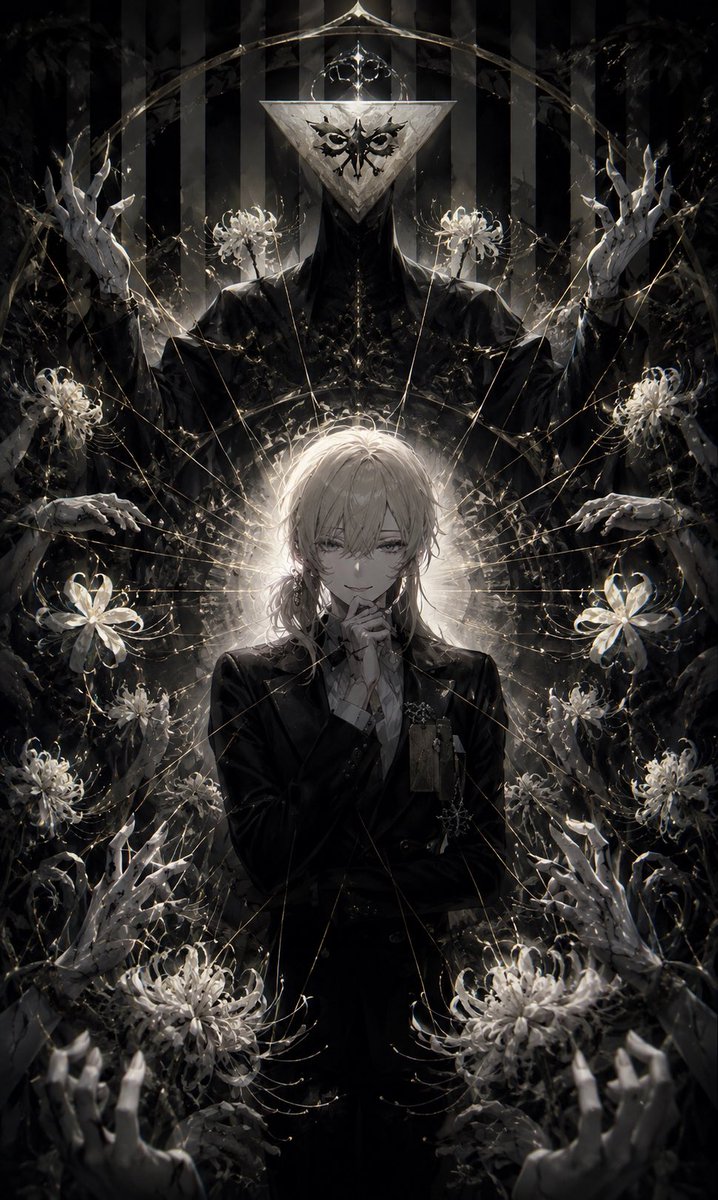
Effects by Tags
Create a dark gothic anime illustration in a tall vertical 2:3 portrait format. Center a slender androgynous young man named {argument name="character name" default="unnamed pale blond youth"} with {argument name="hair color" default="pale ash blond"} messy medium-length hair covering one eye, a faint unsettling smile, and one hand raised thoughtfully to his chin. Dress him in a formal black suit with a white shirt, ornate brooches, chains, and small dangling accessories, rendered in elegant high-detail linework. Behind him, place a towering ritual figure like a black-robed puppeteer or deity with a large inverted triangular metallic mask, black ornamental markings on the mask, and a crown-like geometric halo above it. Use a strict symmetrical composition with a glowing white halo behind the youth’s head, thin golden threads radiating outward like a web, and a black-and-white vertical striped curtain in the background. Surround the subjects with exactly 10 white spider lily flowers: 2 near the masked figure’s shoulders, 2 large flowers at the youth’s mid-left and mid-right, 2 small flowers beside the youth’s lower torso, 2 large flowers near the bottom left and bottom right, and 2 smaller flowers tucked into the lower side foliage. Include exactly 8 pale skeletal porcelain-like hands emerging from darkness: 2 raised near the upper left and upper right, 2 reaching horizontally at mid-left and mid-right, 2 clawing upward at lower left and lower right, and 2 large foreground hands reaching from the bottom corners. The mood should be ominous, elegant, theatrical, and religiously ceremonial, with a monochrome palette of {argument name="main palette" default="black, ivory white, silver gray, and faint antique gold"}, high contrast rim lighting, smoky shadows, delicate floral filaments, crystalline highlights, and dense painterly detail. No text, no watermark, no modern objects, no bright colors.
This is a free AI prompt from the Orelon library. Thousands more image prompts here are free to copy and adapt.
Explore more image prompts





Ready to create
Start with this curated direction in Orelon, then shape it into your next visual.