Visual Effects
Retro Hong Kong Gangster Poster
Likes
3
Views
178
 Orelon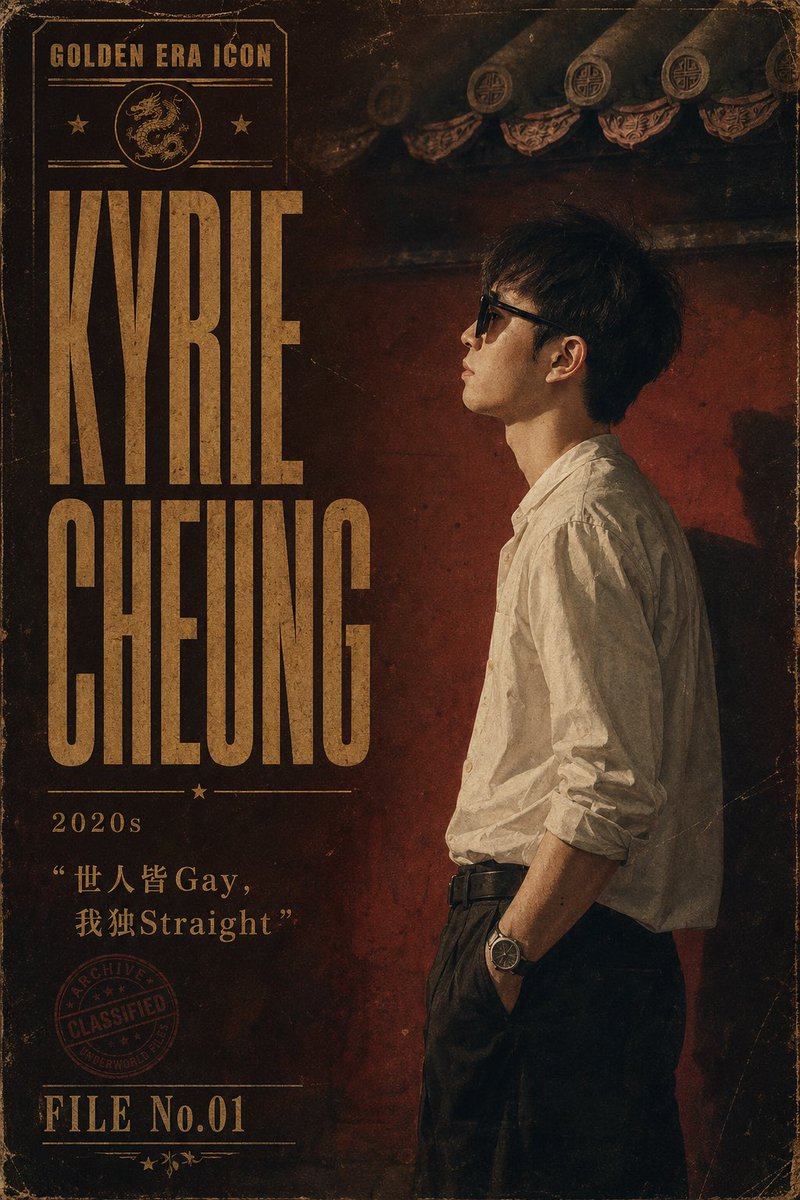
Visual Effects
Create a vertical retro Hong Kong–Macau triad boss style character poster for {argument name="character name" default="Kyrie Cheung"}. Use a gritty cinematic 1970s–1990s crime archive aesthetic with aged paper texture, scratches, dust, worn corners, dark sepia and deep red tones, and faded gold typography. Canvas is a 2:3 portrait poster. The right half shows one young East Asian man in side profile facing left, standing against a dark red weathered wall under dramatic low-key lighting; he has short messy black hair, a calm intimidating posture, a white wrinkled button-up shirt with sleeves rolled to the forearms, black high-waisted trousers, black belt, one hand in pocket, and a wristwatch. Keep the face partially obscured or shadowed for anonymity. The top background includes traditional Chinese roof eaves with circular decorative tiles, dimly lit and distressed. The left half is a bold vintage title layout: small top label reads “GOLDEN ERA ICON” inside a thin rectangular frame with exactly 1 dragon medallion icon and exactly 2 small star icons, then huge condensed block serif text stacked in two lines reading {argument name="main title" default="KYRIE CHEUNG"}. Beneath the title add a thin divider with exactly 1 centered star, then the decade label {argument name="era label" default="2020s"}. Below that add the quote {argument name="quote text" default="“世人皆 Gay, 我独Straight”"} in faded gold, mixing Chinese and English exactly as written. Add exactly 1 red circular archive stamp near the lower left reading “ARCHIVE / CLASSIFIED / UNDERWORLD”. At the bottom left add the file label {argument name="file number" default="FILE No.01"} with thin horizontal rules and exactly 3 tiny decorative stars/leaves underneath. Use tall compressed vintage poster typography, distressed ink, uneven print registration, grain, vignette, and a thin worn border around the poster. No modern clean design, no extra people, no additional text beyond the specified poster elements.
This is a free AI prompt from the Orelon library. Thousands more image prompts here are free to copy and adapt.
Explore more image prompts


Ready to create
Start with this curated direction in Orelon, then shape it into your next visual.