Camera Control
Colossal Android Face Contact
Likes
2
Views
73
 Orelon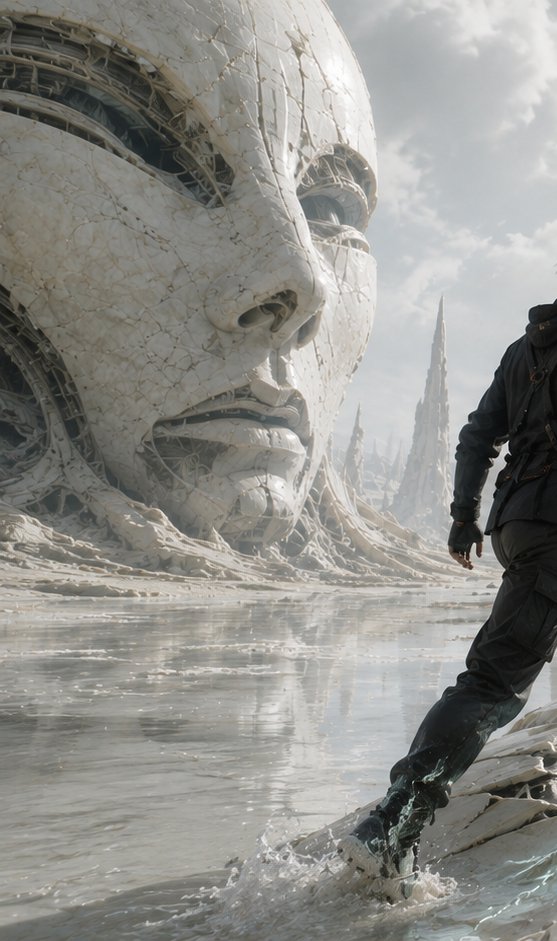
Camera Control
Create a vertical cinematic science-fiction scene titled by mood rather than visible text: a lone explorer makes first contact with an enormous ancient synthetic face half-buried in a pale alien shoreline. The canvas is tall 9:16, ultra-detailed photorealistic concept art, low camera angle near the wet ground. On the left, a colossal white porcelain-like humanoid head dominates the frame, cropped by the top and left edges; its cracked ceramic skin is veined with fine fractures and seams, with exposed dark biomechanical cables, ribs, and machinery visible inside the eye sockets, cheek gaps, mouth, and broken shell. The face is serene and monumental, with realistic nose, lips, and hollow mechanical eyes, like a ruined android deity. On the right foreground, show exactly one human figure: {argument name="character" default="a lone male explorer in a dark weathered survival suit with straps and a small pack"}, seen mostly from behind and cropped at the upper body edge, stepping through shallow reflective water toward the giant face; one boot splashes, creating visible droplets and ripples. The environment is an otherworldly white-gray coast with glossy water, eroded organic-mechanical ridges, scattered debris, and distant sharp cathedral-like spires rising through mist. Lighting is soft overcast daylight with bright diffused sky, pale clouds, subtle haze, and shimmering reflections on the water. Use a desaturated palette of {argument name="color palette" default="ivory white, ash gray, muted blue-gray, and black"}. Emphasize scale, awe, silence, and transformation at the moment of contact. Style: {argument name="visual style" default="high-end cinematic sci-fi realism, intricate biomechanical architecture, 70mm film still, dramatic composition, volumetric atmosphere"}. No text, no logo, no watermark, no extra people, no vehicles.
This is a free AI prompt from the Orelon library. Thousands more image prompts here are free to copy and adapt.
Explore more image prompts





Ready to create
Start with this curated direction in Orelon, then shape it into your next visual.