
premium tech-Style smartphone Duo Poster
A premium photorealistic premium tech-inspired foldable smartphone launch poster with a fashion model, embossed DUO backdrop, product callouts, and four feature cards.
J’aime
0
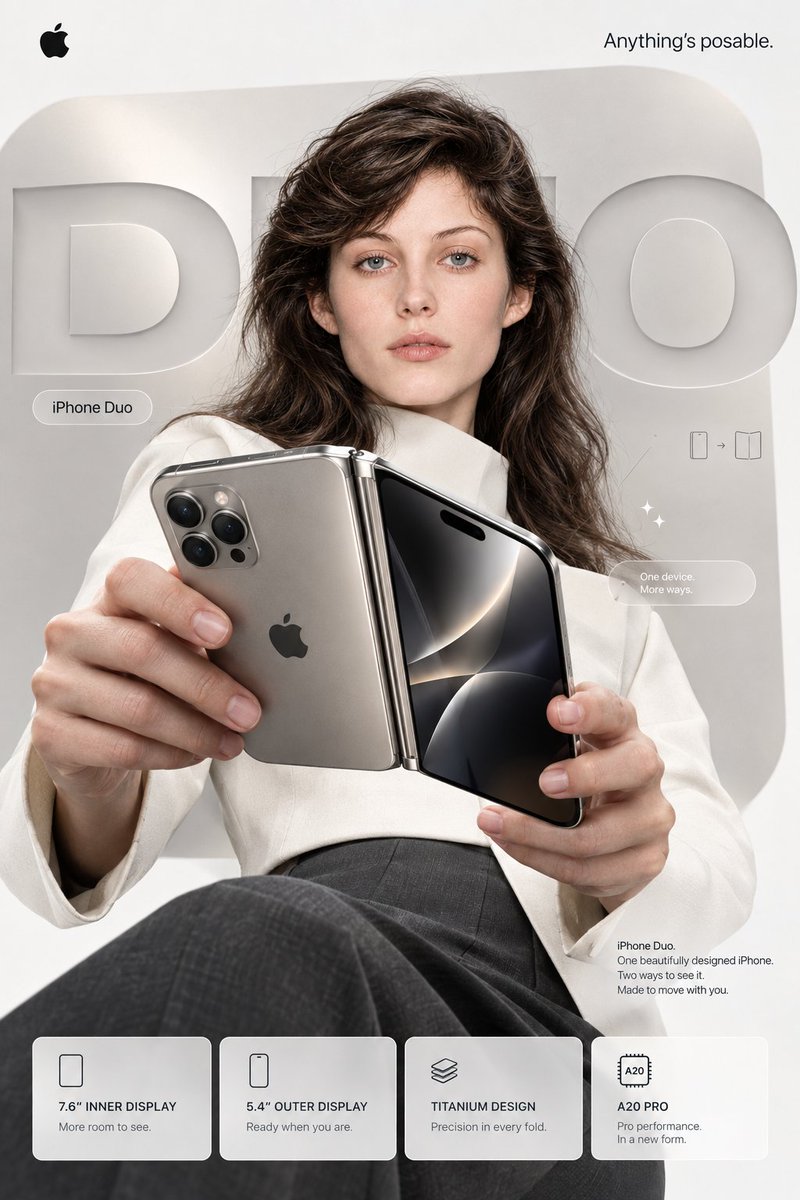
A premium photorealistic premium tech-inspired foldable smartphone launch poster with a fashion model, embossed DUO backdrop, product callouts, and four feature cards.
Goal: Create a premium premium tech-style fashion technology advertising poster for a fictional foldable smartphone called {argument name="product name" default="smartphone Duo"}, featuring a model holding the device toward the camera. Canvas: Vertical 2:3 poster, clean editorial product-ad composition, soft off-white and warm gray palette, high-end studio lighting, photorealistic finish. Layout: Place a small black premium tech logo in the top-left corner and the slogan {argument name="top right slogan" default="Anything's posable."} in the top-right corner. Behind the model, create huge embossed 3D letters spelling "DUO" across a rounded rectangular pale-gray background panel. The letters should look carved or raised from the wall, subtle shadows, matte white-gray material. Main subject: A photorealistic young woman model with {argument name="model hair" default="voluminous wavy dark brown hair"}, pale skin, neutral expression, direct eye contact, natural makeup, seated with one knee forward. She wears a structured ivory/white blazer over tailored dark gray trousers. The pose is confident and minimal, like a luxury magazine cover. Product details: The model holds an open foldable smartphone close to the viewer with both hands, creating strong perspective. The left half shows the exterior back: champagne titanium finish, centered black premium tech logo, triple-lens camera cluster like a Pro smartphone, metallic hinge on the right edge. The right half shows the front display: glossy black screen with abstract silver curved reflections and a pill-shaped dynamic-island cutout near the top. Make the hinge polished and realistic, emphasizing one device in two viewing modes. Text and callouts: Include a small rounded pill label near the left of the model reading "smartphone Duo". Include a small minimal line-icon diagram to the right of the model showing a phone plus a folded-open device. Include a translucent rounded pill callout on the right reading exactly "One device.\nMore ways." Include a small product paragraph in the lower-right above the feature cards reading exactly: "smartphone Duo.\nOne beautifully designed smartphone.\nTwo ways to see it.\nMade to move with you." Bottom feature row: Add exactly 4 frosted-glass rounded feature cards aligned along the bottom. Card 1 has a simple rounded-rectangle screen icon and text "7.6" INNER DISPLAY" with subtext "More room to see." Card 2 has a simple phone icon and text "5.4" OUTER DISPLAY" with subtext "Ready when you are." Card 3 has a stacked-layers icon and text "TITANIUM DESIGN" with subtext "Precision in every fold." Card 4 has a chip icon labeled "A20" and text "A20 PRO" with subtext "Pro performance.\nIn a new form." Style constraints: Minimal premium tech advertising aesthetic, precise typography similar to San Francisco, lots of negative space, soft shadows, glassmorphism cards, premium product photography, no clutter, no extra labels beyond the specified text, no watermark. The overall mood should feel like an official futuristic smartphone launch campaign centered on {argument name="design material" default="champagne titanium"}.
Ceci est un prompt IA gratuit issu de la bibliothèque Orelon. Des milliers d’autres prompts image sont disponibles ici, à copier et adapter librement.
Explorer d’autres prompts image

Prêt à créer
Partez de cette direction sélectionnée dans Orelon, puis façonnez-la pour votre prochain visuel.