
Dance Choreography Instruction Sheet Prompt
A detailed structured prompt for generating a professional dance choreography guide featuring a 3D-rendered dancer and technical motion indicators.
J’aime
422
Vues
19,9 k
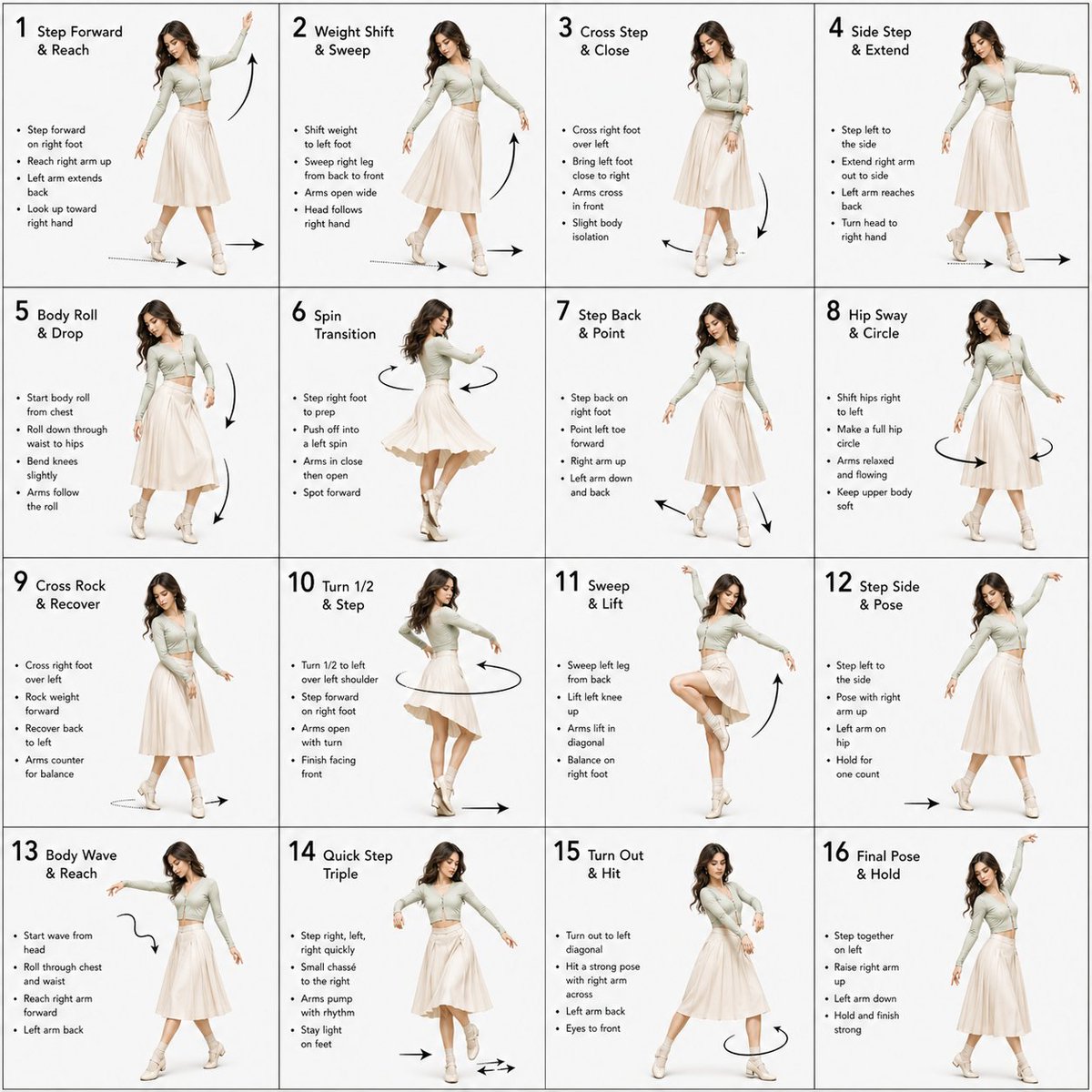
A detailed structured prompt for generating a professional dance choreography guide featuring a 3D-rendered dancer and technical motion indicators.
Dance Sequence Instruction Sheet [VISUAL STYLE] A composition featuring a highly detailed 3D-rendered female dancer. Designed like a professional choreography guide with a technical, diagram-inspired layout. Clean white background, soft studio lighting, and strong contrast to highlight body movement and posture. [GRID LAYOUT] Structured 4×4 panel grid (16 frames total), evenly spaced with thin black divider lines. Each panel is identical in size and clearly numbered from 1 to 16 to show a continuous dance progression. [CHARACTER] Use image1 as the base character. The same female dancer appears consistently across all panels with accurate likeness and proportions. [WARDROBE] The dancer wears a stylish, performance-ready outfit: a well-fitted top paired with a short, flowy skirt. The look should feel modern and visually appealing while still practical for dance movement. Fabric should subtly respond to motion (slight flow and folds), even in grayscale. [PANEL STRUCTURE – EACH FRAME] Top-left: Step number + short dance move title (e.g., “Step 5 – Spin Transition”) Center: Full-body pose capturing a precise moment in the choreography Bottom-left: 3–4 lines of concise instruction describing the move Overlay: Motion arrows and directional guides illustrating how the dancer transitions [MOTION INDICATORS] Incorporate curved arrows for fluid motion, straight arrows for directional steps, and circular indicators for spins or turns. Emphasize rhythm, weight shifts, and body isolation. [RENDER QUALITY] High-detail sculpted 3D style with smooth grayscale shading, subtle shadows, and clean linework. Maintain a polished, concept-art level finish with clarity in every pose. [RESTRICTIONS] No color, no background scenery, no extra characters, no visual clutter, only the dancer and instructional elements.
Ceci est un prompt IA gratuit issu de la bibliothèque Orelon. Des milliers d’autres prompts image sont disponibles ici, à copier et adapter librement.
Explorer d’autres prompts image



Prêt à créer
Partez de cette direction sélectionnée dans Orelon, puis façonnez-la pour votre prochain visuel.