
Three-Style Cube Poster
Creates a three-column visual style exploration poster that transforms a rough cube sketch into realistic, minimalist, and fantasy interpretations.
J’aime
0
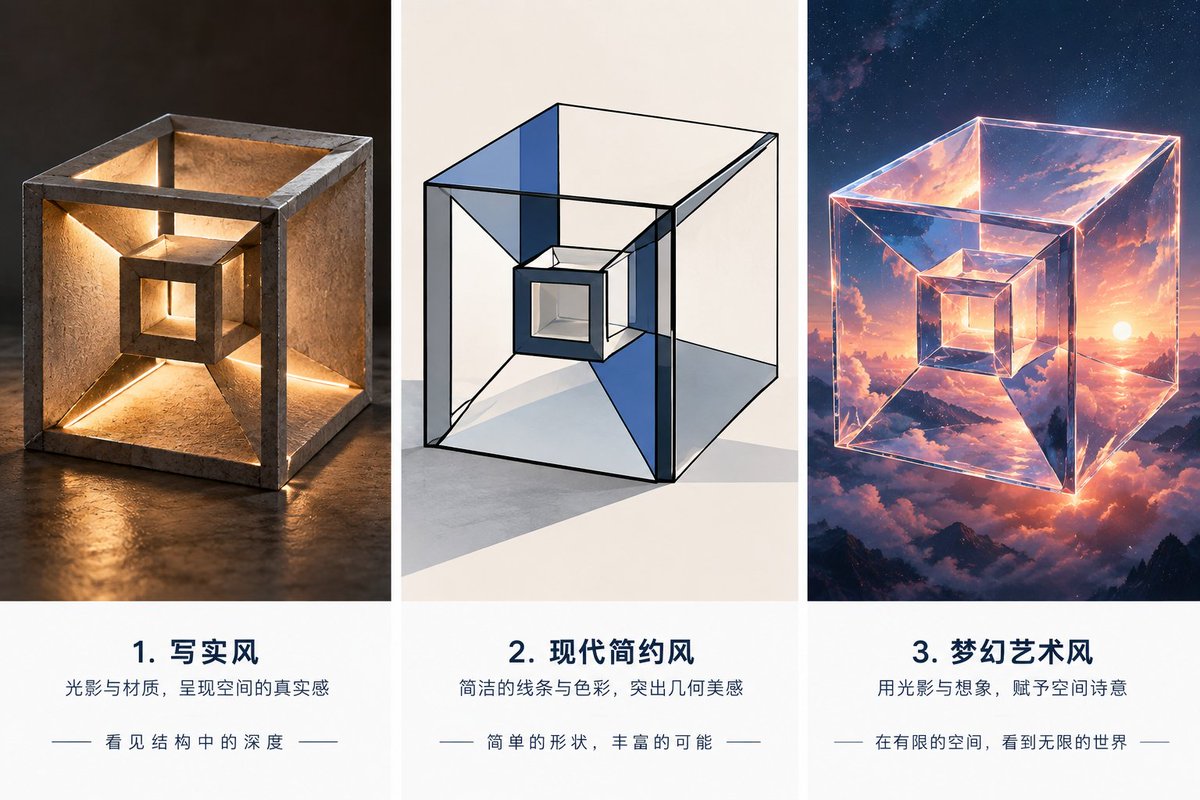
Creates a three-column visual style exploration poster that transforms a rough cube sketch into realistic, minimalist, and fantasy interpretations.
Using the provided reference image as the geometric base, turn the rough hand-drawn nested cube/tunnel form into a polished three-column style exploration poster. Keep the same core structure: an outer cube frame with inward sloping faces leading to a smaller centered cube opening. Create exactly 3 vertical panels separated by white gutters, each showing the same object interpreted in a different visual style, with a caption block underneath each image. Canvas and layout: Wide horizontal poster, 3 equal columns. Each column has a large square image area on top and a clean white text area below. Use elegant editorial spacing and centered typography. Panel 1: Render the reference form as a realistic sculptural object made of rough stone or concrete, sitting on a dark reflective surface. Add warm internal lighting along the inner edges and openings so the structure feels physically deep and architectural. Panel 2: Render the same form as a modern minimalist geometric illustration: clean black outlines, transparent glass-like cube faces, subtle blue and gray planes, white studio background, crisp shadows, and a restrained architectural drawing feel. Panel 3: Render the same form as a dreamy fantasy art object: a glowing transparent crystalline cube floating in the sky, reflecting sunset clouds, mountains, stars, and cosmic light, with luminous pink-orange-blue highlights. Text: Add exactly 3 numbered Chinese caption blocks beneath the panels: 1. Title: {argument name="first panel title" default="1. 写实风"}; subtitle: "光影与材质,呈现空间的真实感"; small line: "- 看见结构中的深度 -" 2. Title: {argument name="second panel title" default="2. 现代简约风"}; subtitle: "简洁的线条与色彩,突出几何美感"; small line: "- 简单的形状,丰富的可能 -" 3. Title: {argument name="third panel title" default="3. 梦幻艺术风"}; subtitle: "用光影与想象,赋予空间诗意"; small line: "- 在有限的空间,看到无限的世界 -" Style constraints: Preserve the reference object's recognizable nested-cube geometry in all 3 panels. Make the poster clean, premium, and presentation-ready. Do not add extra panels, extra objects, watermarks, logos, or unrelated text.
Ceci est un prompt IA gratuit issu de la bibliothèque Orelon. Des milliers d’autres prompts image sont disponibles ici, à copier et adapter librement.
Explorer d’autres prompts image
width: 1176 · aspect: 2:3 · height: 1764
Lire le prompt
width: 716 · aspect: 179:321 · height: 1284
Lire le prompt
Prêt à créer
Partez de cette direction sélectionnée dans Orelon, puis façonnez-la pour votre prochain visuel.