
Orelon logoOrelon
Tarifs
Camera Control

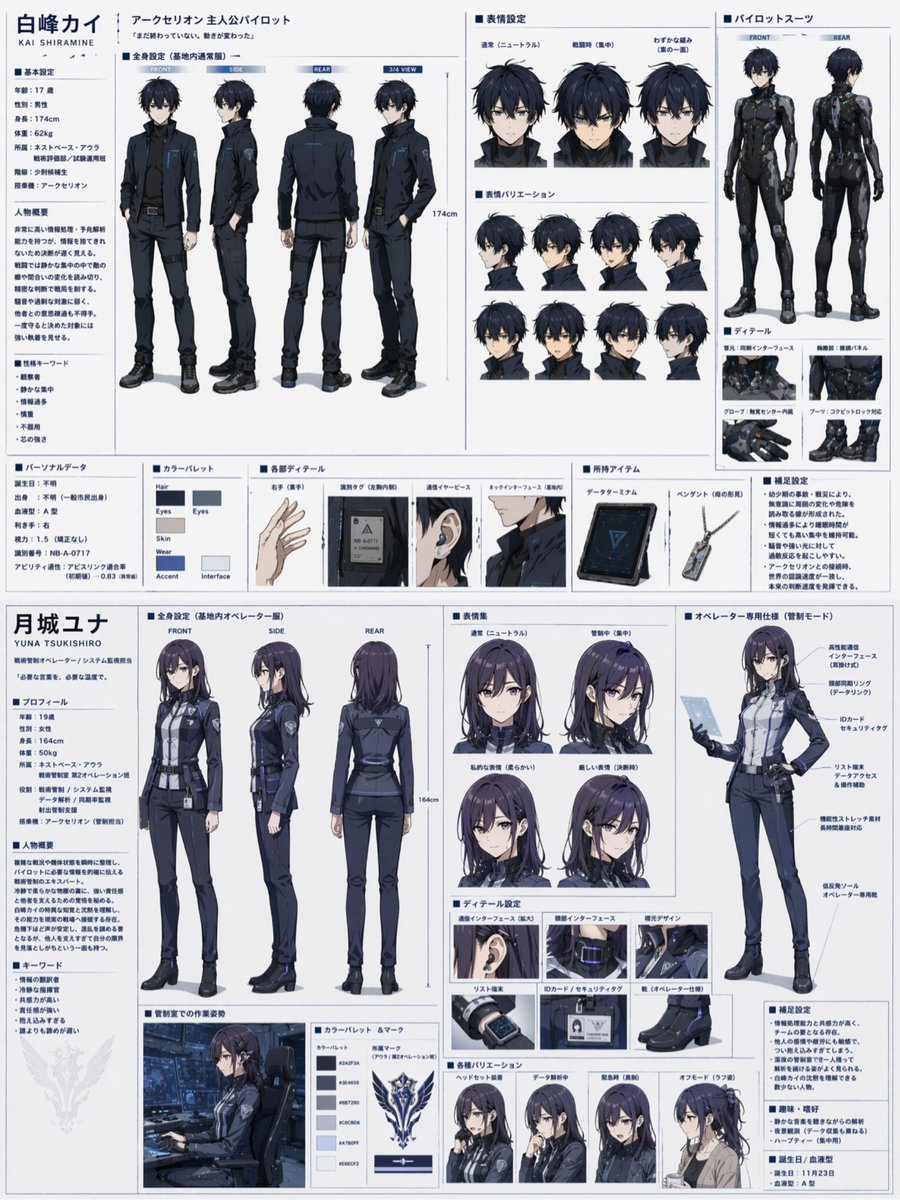
Dual Sci-Fi Character Reference Sheet

Generates a highly detailed, split-page anime character design document for two characters, featuring turnarounds, expressions, and equipment details.

Publié15 avr. 2026
Langue d’origineZH
Catégories
Camera ControlCameraAnime
J’aime
1,7 k
Vues
90,9 k

Prompt complet

Utiliser ce prompt

{ "type": "dual character reference sheet", "theme": "{argument name=\"theme\" default=\"sci-fi mecha pilot and operator\"}", "layout": "horizontal split, top half male, bottom half female", "top_character": { "name": "{argument name=\"male character name\" default=\"白峰カイ\"}", "appearance": "young male, messy black hair, blue eyes", "sections": [ { "title": "profile text", "position": "left column", "description": "basic settings, summary, keywords" }, { "title": "全身設定", "position": "mid-left", "count": 4, "labels": ["FRONT", "SIDE", "REAR", "3/4 VIEW"], "description": "wearing {argument name=\"male uniform color\" default=\"dark blue and black\"} military uniform" }, { "title": "表情設定", "position": "top-right", "count": 3, "labels": ["通常", "戦闘時", "わずかな緩み"] }, { "title": "表情バリエーション", "position": "mid-right", "count": 8, "description": "smaller headshots, various angles" }, { "title": "パイロットスーツ", "position": "far-right", "count": 2, "labels": ["FRONT", "REAR"], "description": "tight black plugsuit" }, { "title": "ディテール", "position": "bottom-right", "count": 4, "labels": ["首元", "胸部", "グローブ", "ブーツ"] }, { "title": "bottom row", "position": "bottom", "elements": ["カラーパレット (6 swatches)", "各部ディテール (4 items: hand, tag, earpiece, neck)", "所持アイテム (2 items: tablet, pendant)", "補足設定 (text block)"] } ] }, "bottom_character": { "name": "{argument name=\"female character name\" default=\"月城ユナ\"}", "appearance": "young female, long dark purple hair, purple eyes", "sections": [ { "title": "profile text", "position": "left column", "description": "profile, summary, keywords" }, { "title": "全身設定", "position": "mid-left", "count": 3, "labels": ["FRONT", "SIDE", "REAR"], "description": "wearing {argument name=\"female uniform color\" default=\"dark blue and grey\"} uniform with skirt" }, { "title": "表情集", "position": "mid-right", "count": 4, "labels": ["通常", "管制中", "私的な表情", "厳しい表情"] }, { "title": "オペレーター専用仕様", "position": "far-right", "count": 1, "description": "3/4 view holding tablet, callout lines" }, { "title": "ディテール設定", "position": "bottom-right", "count": 6, "labels": ["通信インターフェース", "頸部インターフェース", "襟元デザイン", "リスト端末", "IDカード", "靴"] }, { "title": "bottom row", "position": "bottom", "elements": ["管制室での作業姿勢 (1 half-body shot)", "カラーパレット & マーク (6 swatches, 1 emblem)", "各種バリエーション (4 headshots: ヘッドセット装着, データ解析中, 緊急時, オフモード)", "補足設定 (text block)"] } ] } }

Comment utiliser ce prompt

  1. 1Sélectionnez « Utiliser ce prompt » pour l’ouvrir dans le Studio Orelon.
  2. 2Adaptez le sujet, le style et les détails à votre idée.
  3. 3Générez avec GPT Image 2, puis itérez et affinez jusqu’à ce que le résultat vous convienne.

Ceci est un prompt IA gratuit issu de la bibliothèque Orelon. Des milliers d’autres prompts image sont disponibles ici, à copier et adapter librement.

Explorer d’autres prompts image

Prêt à créer

Faites de ce prompt le vôtre.

Partez de cette direction sélectionnée dans Orelon, puis façonnez-la pour votre prochain visuel.

Utiliser ce prompt





