
Mount Fuji Watercolor Transformation
Creates a split before-and-after scene turning a realistic Mount Fuji riverside landscape into a minimalist watercolor travel illustration.
Likes
0
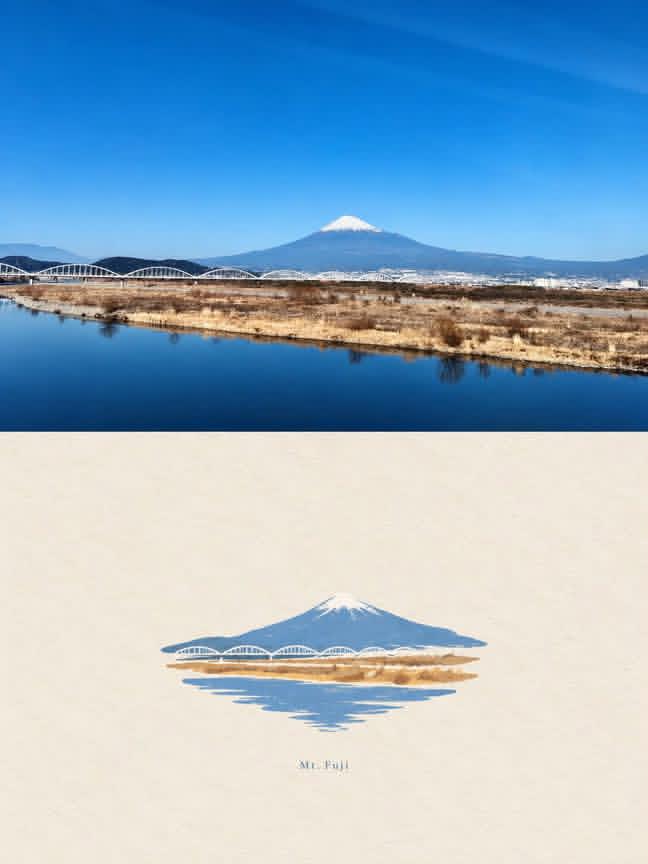
Creates a split before-and-after scene turning a realistic Mount Fuji riverside landscape into a minimalist watercolor travel illustration.
Create a vertical before-and-after comparison image showing an ordinary landscape transformed into a minimalist watercolor-and-ink illustration. Canvas: portrait 4:5 aspect ratio. Layout: split horizontally into two equal panels with no border; the top panel is a realistic landscape photo and the bottom panel is the stylized illustration on warm off-white watercolor paper. Top panel: a clear daytime scene with {argument name="mountain name" default="Mount Fuji"} centered in the distance, blue sky with subtle wispy clouds, snow-capped peak, low mountain range, a row of white arched bridges crossing the midground, dry tan riverbank grasses, calm deep-blue river in the foreground with reflections, crisp natural colors and photographic detail. Bottom panel: preserve the exact same composition but simplify it into a delicate minimalist watercolor and thin ink sketch; small centered island-like landscape motif with a blue mountain silhouette and white snowy peak, white arched bridges, tan ochre riverbank, soft blue water reflections below, lots of empty paper around it, light washes, gentle bleeding edges, sparse fine-line details, elegant Japanese travel-sketch feeling. Include exactly one tiny handwritten signature-like mark centered beneath the illustration, very subtle and not readable. Use {argument name="sky color" default="clear vivid blue"}, {argument name="watercolor paper tone" default="warm ivory"}, and {argument name="illustration style" default="delicate minimalist watercolor and ink"}. Avoid extra text, people, vehicles, frames, heavy outlines, or clutter.
Dies ist ein kostenloser KI-Prompt aus der Orelon-Bibliothek. Tausende weitere Bild-Prompts kannst du hier kostenlos kopieren und anpassen.
Weitere Bild-Prompts entdecken

Bereit zum Erstellen
Starte mit dieser handverlesenen Richtung in Orelon und forme daraus dein nächstes Visual.