
AI Product Sketch to Lamp Render
A photorealistic studio scene visualizing an AI workflow that transforms a hand-drawn product sketch into a finished ceramic table lamp.
Likes
0
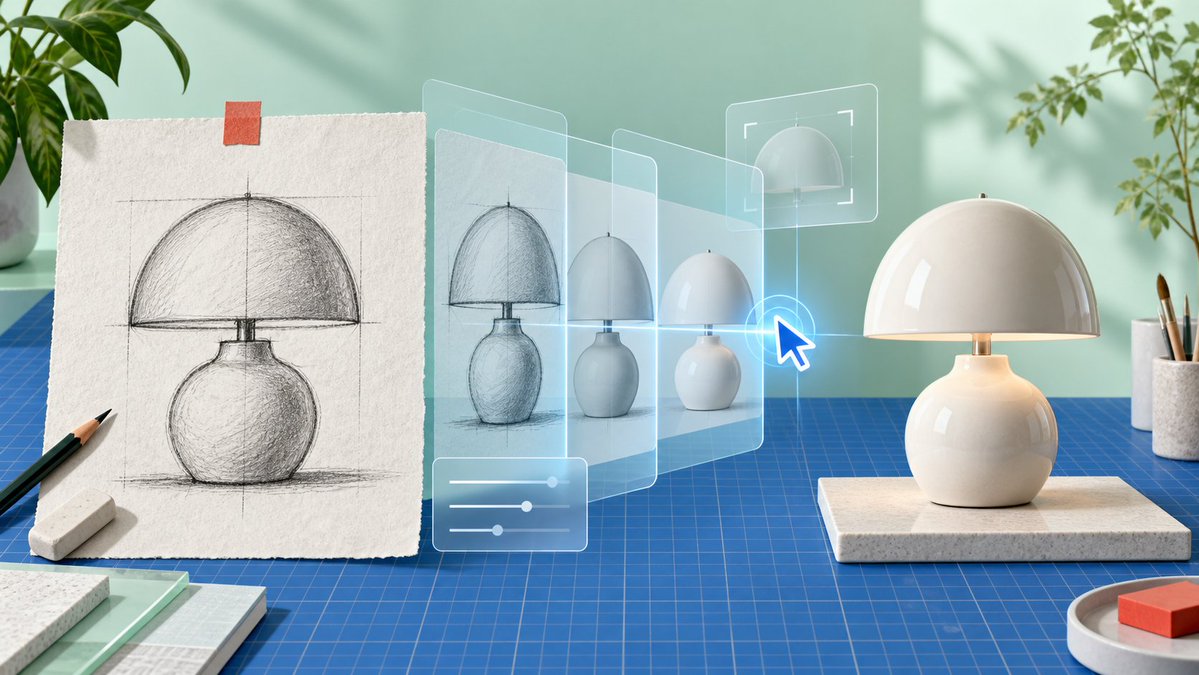
A photorealistic studio scene visualizing an AI workflow that transforms a hand-drawn product sketch into a finished ceramic table lamp.
Create a clean, photorealistic product-design workspace scene showing an AI-assisted transformation from sketch to finished object. Use a wide 16:9 canvas with soft natural daylight, pastel mint-green wall, realistic shadows from window light, and a modern maker-studio aesthetic. On the left, place a sheet of rough off-white textured drawing paper standing upright on a blue gridded cutting mat, held at the top with one small strip of orange tape; the paper shows a detailed graphite construction sketch of a {argument name="product type" default="mushroom-shaped ceramic table lamp"}, including vertical and horizontal guide lines, a domed shade, a short neck, rounded bulbous base, hatch shading, and a ground shadow. In front of the sketch are exactly 2 drawing tools: one black pencil angled diagonally and one white rectangular eraser. Across the center, add a translucent futuristic UI visualization: exactly 4 semi-transparent glass panels receding from left to right, each showing the lamp evolving from rough sketch to cleaner render to simplified 3D form, with pale cyan outlines and a subtle blue glow. Add exactly 3 interface overlays: one bottom-left rounded rectangle with three horizontal slider controls, one upper-right rectangular crop/selection frame around a dome preview, and one bright blue glowing cursor arrow pointing at the lamp evolution. On the right, place the final physical {argument name="product color and material" default="glossy warm-white ceramic"} lamp on a rectangular speckled stone platform: a smooth hemispherical dome shade, small brass stem, softly glowing warm light under the shade, and a round bulbous base matching the sketch. Surround the scene with studio props: leafy green plants partially visible at the upper left and upper right, a white cup holding paintbrushes at the far right, a small round tray with a red-orange block in the lower right, and stacked sample boards or notebooks in the lower left. The blue cutting mat should cover the tabletop with precise grid lines, reinforcing a design-prototyping environment. No visible text, no logos, no watermark; emphasize the concept of turning a hand sketch into a finished product through transparent AI editing layers.
Dies ist ein kostenloser KI-Prompt aus der Orelon-Bibliothek. Tausende weitere Bild-Prompts kannst du hier kostenlos kopieren und anpassen.
Weitere Bild-Prompts entdecken

Bereit zum Erstellen
Starte mit dieser handverlesenen Richtung in Orelon und forme daraus dein nächstes Visual.