
Dance Movement Reference Sheet
A technical prompt to generate a 4x4 character movement sheet in a monochromatic 3D rendered style, ideal for animation and game concept art.
Likes
785
Aufrufe
40.024
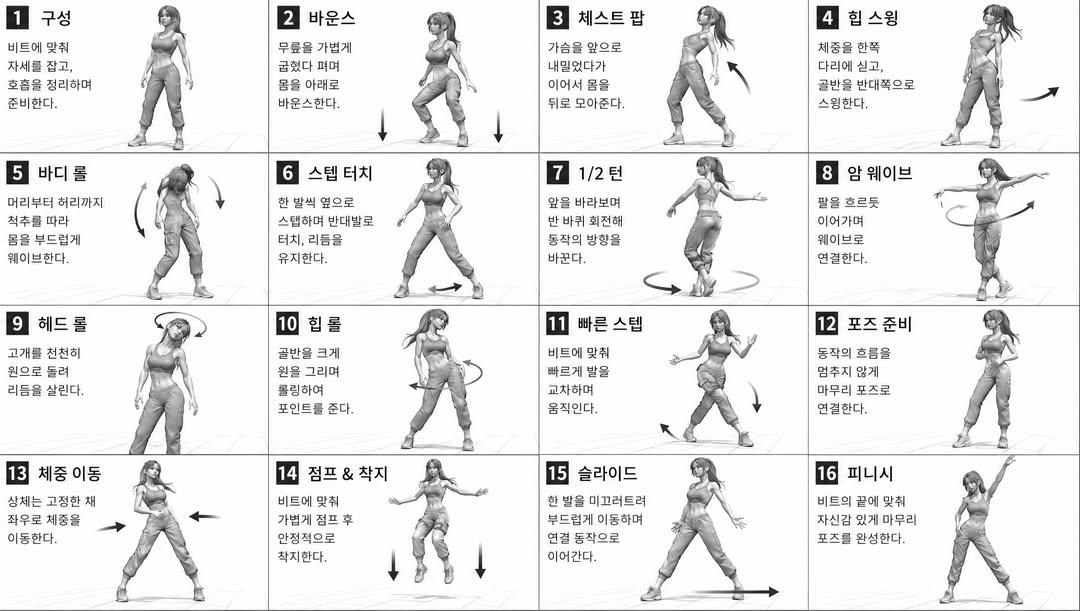
A technical prompt to generate a 4x4 character movement sheet in a monochromatic 3D rendered style, ideal for animation and game concept art.
[STYLE] monochromatic grayscale illustration, 3D rendered character, clean instructional reference sheet, white background, comic-style cell grid layout, technical diagram aesthetic [LAYOUT] 4x4 grid layout, 16 panels total, each panel separated by thin black border lines, numbered cells from 1 to 16, consistent panel size [CHARACTER] {argument name="character" default="young female dancer, athletic build, ponytail hairstyle, crop top and baggy pants, sneakers"}, same character in all panels [PANEL STRUCTURE - per cell] top-left: bold number badge + {argument name="title" default="Korean title text"} center: full-body character pose illustration bottom-left: {argument name="description" default="Korean description text (3-4 lines)"} overlay: directional arrows indicating movement direction [ARROWS / MOTION INDICATORS] curved arrows, straight arrows, circular rotation indicators, placed around the character to show movement flow and direction [RENDERING STYLE] high detail 3D sculpt style, soft studio lighting, subtle shadows, no color, grayscale shading, clean linework, game concept art quality [NEGATIVE] no background scenery, no color tones, no extra characters, no cluttered backgrounds
Dies ist ein kostenloser KI-Prompt aus der Orelon-Bibliothek. Tausende weitere Bild-Prompts kannst du hier kostenlos kopieren und anpassen.
Weitere Bild-Prompts entdecken



Bereit zum Erstellen
Starte mit dieser handverlesenen Richtung in Orelon und forme daraus dein nächstes Visual.