
3x3 Vocaloid MV Character Cuts
Generates a 16:9 anime music-video storyboard grid from a reference character with nine varied energetic cuts.
게시일2026. 9. 8.
원문 언어EN
좋아요
0
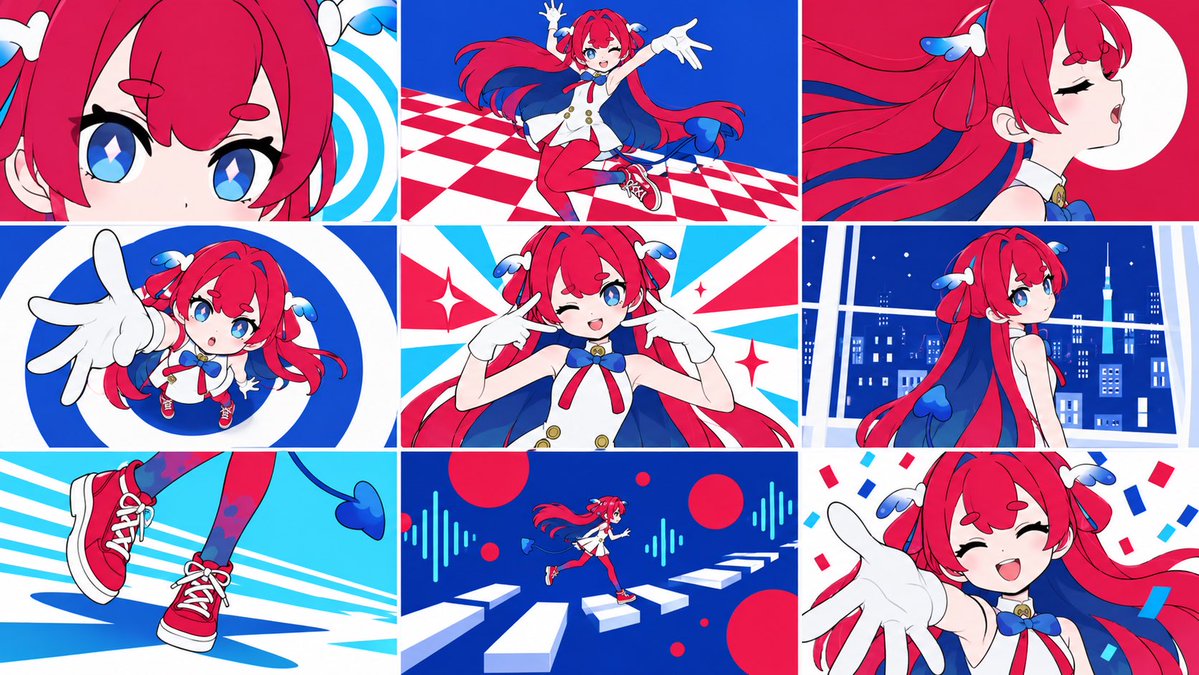
Generates a 16:9 anime music-video storyboard grid from a reference character with nine varied energetic cuts.
Using REFERENCE_1 as the character base, create a {argument name="aspect ratio" default="16:9"} image made of exactly 9 equal panels in a 3x3 grid, like energetic Vocaloid music-video cuts. Keep the character design consistent, but vary pose, camera angle, crop, facial expression, and background in every panel. Use a flat, clean anime MV style with bold red, blue, cyan, and white graphic shapes, crisp line art, high contrast, and no UI, captions, watermark, or screenshot frame. Panel plan, exactly 9 cuts: 1. Extreme close-up crop of the character's eyes and bangs with a blue-and-white spiral graphic background. 2. Full-body dynamic jump/dance pose on a red-and-white checkerboard floor against a deep blue background. 3. Side-profile close-up with eyes closed, hair flowing dramatically, and a large white circle on a red background. 4. Chibi-like forced-perspective shot reaching one gloved hand toward the camera inside a bold blue-and-white circular graphic. 5. Front upper-body idol pose, winking and pointing both fingers toward the cheeks, with red, cyan, and white burst shapes and sparkles. 6. Three-quarter back view looking over the shoulder in front of a blue nighttime city window scene. 7. Close-up of the red sneakers and legs running or stepping across cyan speed lines. 8. Tiny full-body running figure across floating white piano-key platforms, with red circles and cyan audio-wave graphics on a dark blue background. 9. Happy close-up reaching one gloved hand toward the viewer, smiling with eyes closed, surrounded by red and blue confetti. Overall direction: make the grid feel like a polished animated opening or Vocaloid MV storyboard for {argument name="character name" default="this character"}; preserve the reference character's identity while prioritizing varied cinematic cuts and rhythmic graphic backgrounds.
이건 Orelon 라이브러리의 무료 AI 프롬프트예요. 여기에는 자유롭게 복사하고 응용할 수 있는 이미지 프롬프트가 수천 개 더 있어요.
이미지 프롬프트 더 둘러보기



만들 준비됐나요
Orelon에서 이 큐레이션된 방향으로 시작한 다음, 다음 비주얼로 다듬어 가세요.