
Character Consistency Reference Chart
A technical prompt for creating a visual reference board to lock character identity across multiple angles, expressions, and details.
좋아요
1.1천
조회수
10.6만
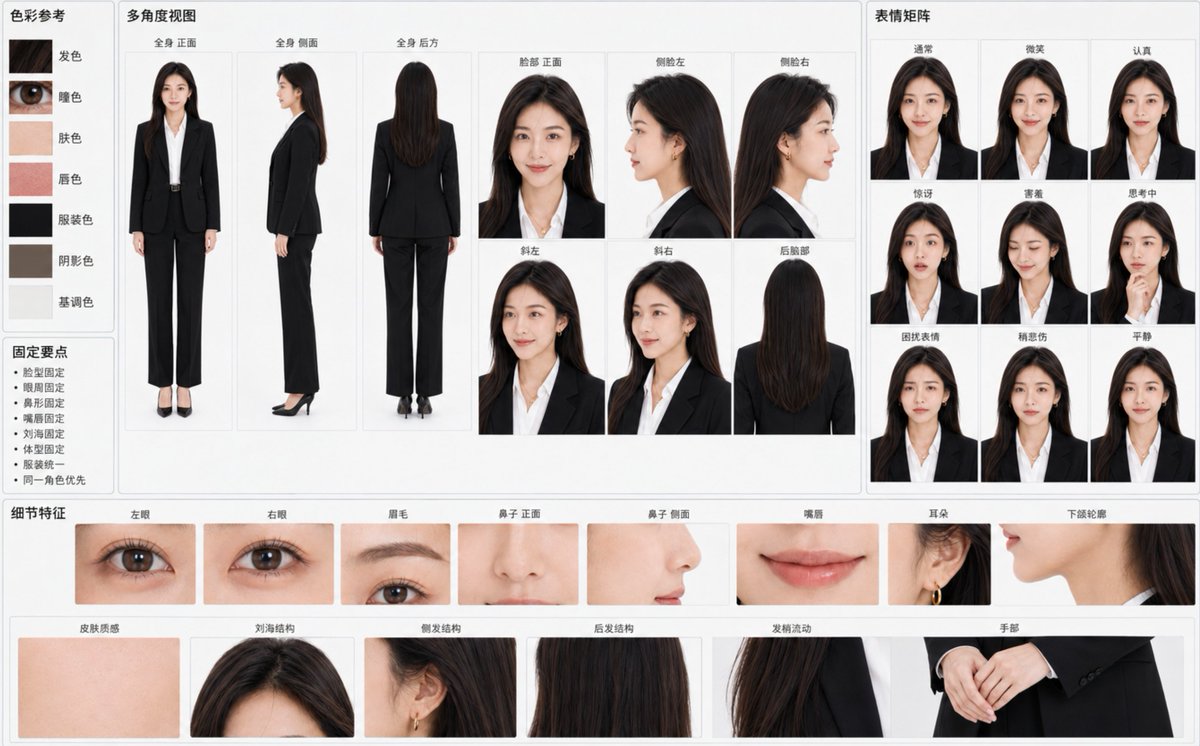
A technical prompt for creating a visual reference board to lock character identity across multiple angles, expressions, and details.
Create a "{argument name="chart title" default="Character Identity Consistency Reference Chart"}" based on the attached original character image, horizontal {argument name="ratio" default="16:10"}, {argument name="background color" default="light gray-white background"}, professional visual data board layout. The primary goal is to make all panels clearly recognizable as the exact same character at a glance, rather than multiple similar individuals. Treat the character's identity in the reference image as an unchangeable hard constraint. Strictly lock: - Face width-to-height ratio, cheekbones, cheeks, jawline, and chin - Eye contours, distance between eyes, eyelid structure, and gaze temperament - Eyebrow arch, thickness, color, and eyebrow-to-eye distance - Bridge of the nose, tip, nostrils, and side profile nose shape - Upper/lower lip thickness, lip peak, corners, and natural lip color - Skin tone, pores, flush, and natural skin texture - Hairline, parting, bangs, side hair, back hair length, and hair strand flow - Age impression, skeletal frame, shoulder width, limb length, and overall body type - Original clothing, original art style, light texture, and overall atmosphere Use large panels in the center to display: - Full body front - Full body side - Full body back - Face front - Left profile - Right profile - Three-quarter left - Three-quarter right - Back of the head Maintain perfectly consistent skull structure, relative position of facial features, hair volume, and body proportions for every angle. The profile must accurately continue the bridge of the nose, lips, chin, and forehead structure from the front; generating different character-style profiles is prohibited. Configure a small expression matrix on the right: - Normal - Smile - Serious - Surprised - Shy - Thinking - Troubled - Slightly sad - Calm Maintain the same pupils, base eye size, nose shape, lip shape, and face shape. Smiles should be natural and restrained, not changing the character's age or temperament. Configure fine identity anchors at the bottom: - Left eye / Right eye / Eyebrows - Nose (front/side) / Lips / Ears - Jawline contour / Skin texture - Bangs / side hair / back hair structure / Hair end flow - Hands Add 5-7 accurate color samples on the left: hair, eyes, skin, lips, clothing, shadow, and tone color. Add minimalist "Fix Points": face shape fixed, eye area fixed, nose shape fixed, lips fixed, bangs fixed, body type fixed, clothing unified, same character priority. Background clean, soft uniform lighting, no cinematic lighting, strong depth of field, or decorative elements. Realistic characters retain natural pores, fine hair, and slight skin tone variations; non-realistic characters strictly maintain the original image's lines, color blocks, shadows, and materials without unauthorized style conversion. All labels use clear simplified Chinese, moderate font size, not overlapping characters. If space is insufficient, prioritize identity anchors and main angles, reduce duplicate panels, and do not force a full layout by shrinking text or sacrificing character consistency.
이건 Orelon 라이브러리의 무료 AI 프롬프트예요. 여기에는 자유롭게 복사하고 응용할 수 있는 이미지 프롬프트가 수천 개 더 있어요.
이미지 프롬프트 더 둘러보기





만들 준비됐나요
Orelon에서 이 큐레이션된 방향으로 시작한 다음, 다음 비주얼로 다듬어 가세요.