
Nine-Panel Anime Storyboard Collage
Generates a cinematic 3x3 anime montage of a silver-haired girl with Japanese lyric-style captions for music visuals, storyboards, or album art.
좋아요
0
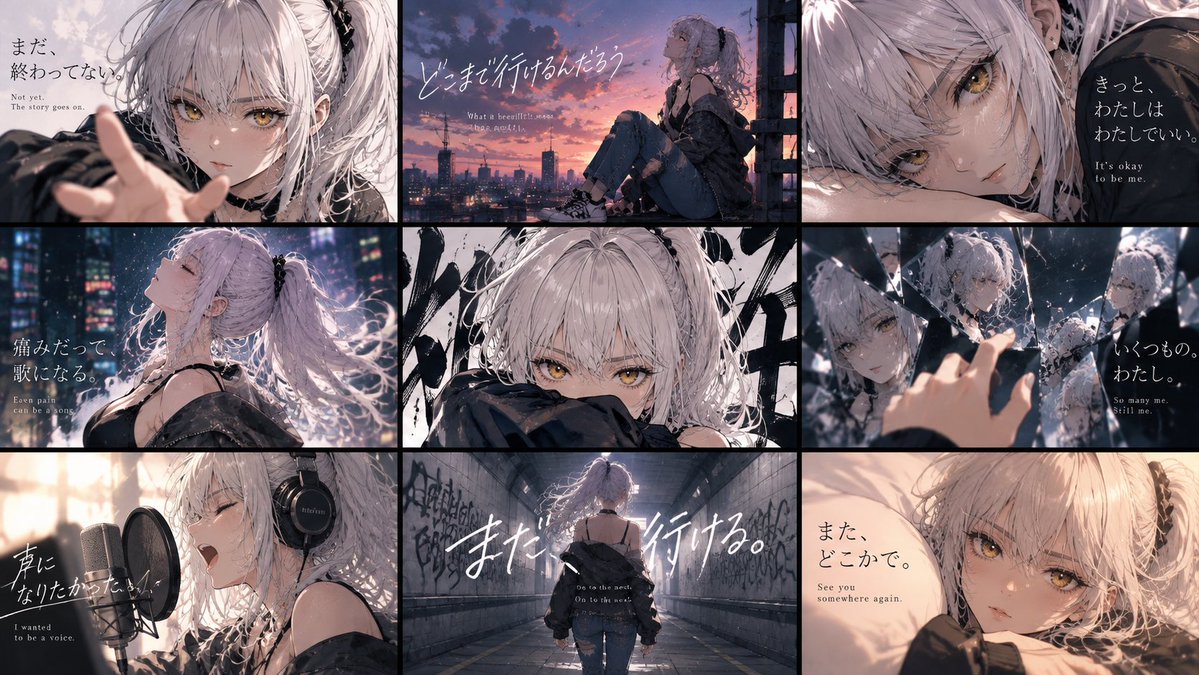
Generates a cinematic 3x3 anime montage of a silver-haired girl with Japanese lyric-style captions for music visuals, storyboards, or album art.
Goal: Create a cinematic 3x3 anime key-visual collage featuring {argument name="character name" default="an unnamed silver-haired girl"} across nine emotional story panels, like a music video storyboard or visual novel ending montage. Canvas: Wide 16:9 image, approximately 1200x675, divided by thick black gutters into exactly 9 rectangular panels arranged in 3 columns and 3 rows. Use a moody dusk-to-night palette with soft bloom, film grain, shallow depth of field, rain/snow-like particles, and high-detail anime rendering. Main character: A young anime girl with pale skin, messy long {argument name="hair color" default="silver-white"} hair in loose twin tails with black ribbons, golden amber eyes, delicate face, and a melancholic expression. Outfit is dark streetwear: oversized black off-shoulder jacket, black camisole/straps, distressed jeans in some panels, sneakers in full-body views, and headphones in the singing panel. Keep her recognizable in all nine panels. Layout and panel content: Use exactly 9 discrete panels. 1. Top-left: close-up from the front, the girl reaches one hand toward the viewer with soft blurred fingers in the foreground; pale sky background. Add Japanese text 「まだ, 終わってない.」 with small English subtitle "Not yet. The story goes on." 2. Top-center: side view of the girl sitting on a rooftop or balcony ledge at sunset, city skyline and antennas in the distance, orange-purple clouds. Add large handwritten Japanese text 「どこまで行けるんだろう」 and a tiny English subtitle suggesting "What a beautiful sunset." 3. Top-right: extreme close-up of her face lying sideways, amber eye prominent, dark background on the right. Add Japanese text 「きっと, わたしはわたしでいい.」 with English subtitle "It's okay to be me." 4. Middle-left: profile bust shot in a rainy neon city at night, head tilted back, eyes closed, hair flowing, glowing skyscraper lights behind. Add Japanese text 「痛みだって歌になる.」 with English subtitle "Even pain can be a song." 5. Middle-center: intense front close-up, only her eyes and upper face visible above a dark sleeve, abstract black brushstroke graffiti behind her; no large subtitle needed. 6. Middle-right: fragmented mirror scene with her reflected in multiple shards, one hand reaching toward broken glass; cool blue lighting. Add Japanese text 「いくつもの, わたし.」 with English subtitle "So many me. Still me." 7. Bottom-left: recording studio scene, side view of her singing passionately into a large condenser microphone with pop filter, wearing black over-ear headphones. Add Japanese text 「声になりたかった.」 with English subtitle "I wanted to be a voice." 8. Bottom-center: rear full-body shot of her walking alone down a graffiti-covered tunnel or underpass toward a bright exit, oversized jacket slipping off shoulders. Add very large white handwritten Japanese text 「また, 行ける.」 plus small English subtitle "Go to the next. On to the next." 9. Bottom-right: warm intimate close-up of her lying on a pillow or bed, looking at the viewer with a soft tired expression. Add Japanese text 「また, どこかで.」 with English subtitle "See you somewhere again." Typography: Mix elegant vertical Japanese Mincho-style text and expressive handwritten white brush script. English translations should be small, serif, and placed beneath or near the Japanese. Keep text legible but integrated into the cinematic image. Visual style: Ultra-detailed modern anime illustration, emotional J-pop album cover aesthetic, soft rim light on hair, sparkling highlights in amber eyes, painterly backgrounds, realistic lighting, dramatic crops, black panel borders, subtle chromatic aberration, no logos or watermarks. Customizable mood: Overall feeling should be {argument name="emotional tone" default="bittersweet, resilient, and quietly hopeful"}.
이건 Orelon 라이브러리의 무료 AI 프롬프트예요. 여기에는 자유롭게 복사하고 응용할 수 있는 이미지 프롬프트가 수천 개 더 있어요.
이미지 프롬프트 더 둘러보기



만들 준비됐나요
Orelon에서 이 큐레이션된 방향으로 시작한 다음, 다음 비주얼로 다듬어 가세요.