
Commercial
Airy Reflective Wedding Save the Date
点赞
22
浏览
2034
Commercial
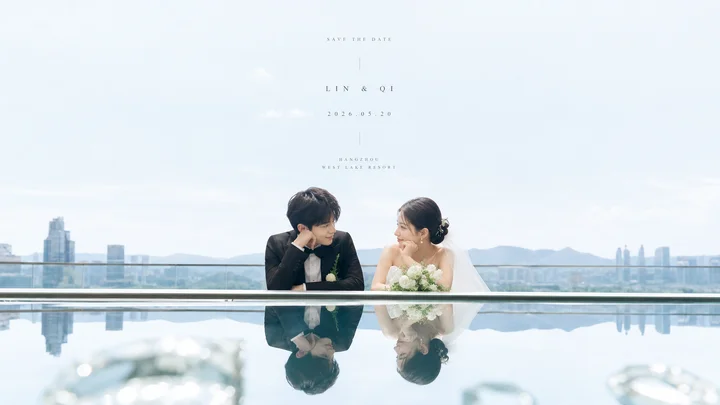
Create a bright, airy cinematic wedding save-the-date photograph with a clean mirror-reflection surprise. Use a wide horizontal 16:9 canvas. The upper two-thirds should be pale blue sky and high-key negative space with a soft, slightly hazy city skyline and distant mountains near the horizon. In the lower middle, place an Asian bride and groom leaning on a sleek glass balcony railing beside an infinity pool or highly reflective glass/water surface; the railing forms a crisp horizontal line that divides the real scene above from the inverted reflection below. The groom is on the left in a black suit with a white boutonniere, resting his chin on one hand and smiling toward the bride. The bride is on the right in an elegant white strapless wedding dress with veil, hair in a low bun, holding a rounded white flower bouquet, smiling back at him. Show exactly two people: one groom and one bride. Below the horizontal line, show their clear upside-down reflection in the still reflective surface, with faint blurred glass highlights in the extreme foreground. Center small, delicate, widely spaced serif text in the open sky: top line “SAVE THE DATE”, middle line “LIN & QI”, date line “2026.05.20”, then a tiny vertical divider, then venue lines “SHANGHAI” and “WEST LAKE RESORT”. Allow customization of the couple names as {argument name="couple names" default="LIN & QI"}, the date as {argument name="wedding date" default="2026.05.20"}, the venue city as {argument name="venue city" default="SHANGHAI"}, the venue name as {argument name="venue name" default="WEST LAKE RESORT"}, and the overall subject as {argument name="theme object" default="wedding couple"}. Visual style: luminous editorial wedding photography, soft natural daylight, pastel blue-white palette, minimal composition, shallow depth of field, refined luxury, no borders, no watermark, no extra people or extra text.
这是 Orelon 提示词库里的一条免费 AI 提示词。这里还有成千上万条图像提示词,都能免费复制和改用。
探索更多图像提示词




准备好就开始
从这条精选创作方向开始,在 Orelon 中塑造你的下一张视觉作品。