
Visual Effects
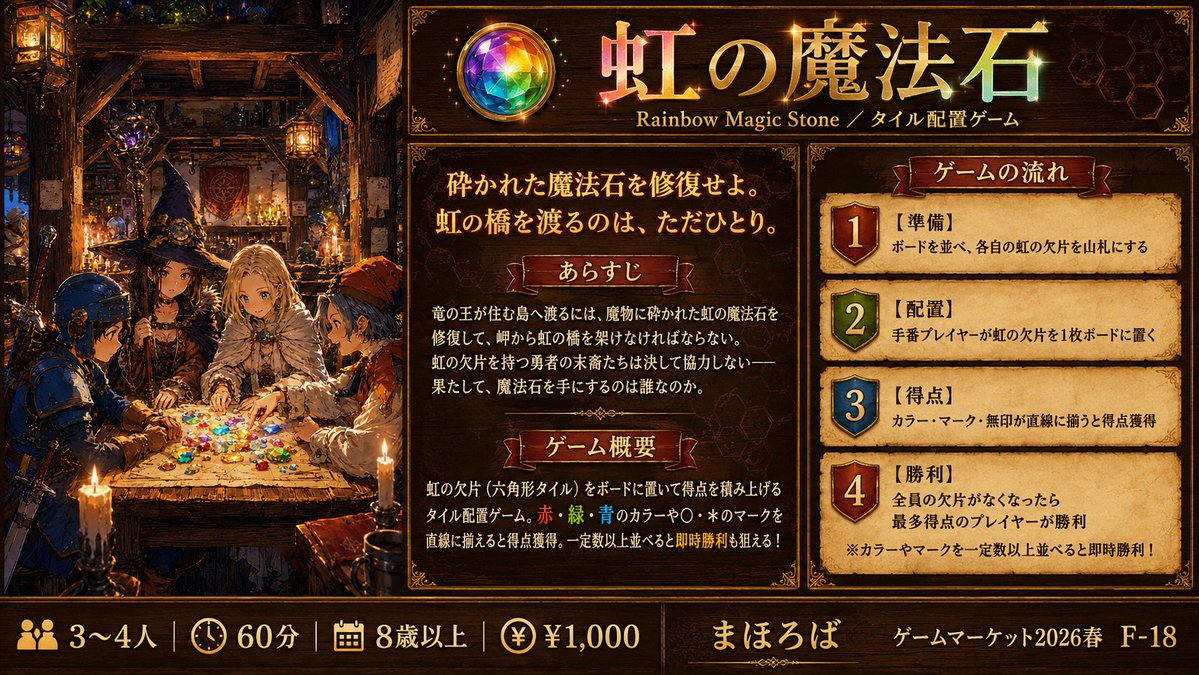
Rainbow Magic Stone Board Game Flyer
浏览
74
Visual Effects
Goal: Create a richly illustrated anime-style one-page promotional explanation image for a fantasy tile placement board game titled {argument name="game title" default="虹の魔法石"}, with a dark medieval magic tavern atmosphere and readable Japanese game information. Canvas: Wide horizontal 16:9 layout, approximately 1200×675 px. Use an ornate dark-brown and gold fantasy UI frame, parchment panels, glowing candlelight, jewel highlights, and premium board-game-ad styling. Layout: Split the image into three main vertical areas plus a bottom information bar. Left area occupies about one third of the canvas and shows the narrative illustration. Center area contains the title header and two explanatory parchment sections. Right area contains a numbered game-flow panel with exactly 4 steps. Bottom bar spans the full width with player count, play time, age, price, publisher, and event booth information. Left illustration: Inside a cozy medieval tavern or wizard workshop, show exactly 4 anime adventurers gathered around a wooden table covered with many small rainbow-colored gem or hex-tile pieces. The four visible characters are: 1) a blue-armored knight or soldier on the far left, 2) a dark-robed wizard-like figure near the back left, 3) a pale blond noble or mage seated at the center, 4) an orange-hooded adventurer on the right. Warm candles, hanging lanterns, shelves, bottles, magic tools, timber beams, and deep shadows fill the background. The table glows with scattered red, green, blue, yellow, purple, and clear gem fragments. Faces may be softly simplified, but the scene should feel detailed and cinematic. Top header: Place a circular rainbow gemstone emblem on the upper center-left of the text area. Beside it, large gold-and-rainbow Japanese title text: {argument name="game title" default="虹の魔法石"}. Under the title, add the subtitle text: "Rainbow Magic Stone / タイル配置ゲーム". Add subtle sparkles around the title and gemstone. Center parchment panel: Add the large tagline in Japanese: {argument name="tagline" default="砕かれた魔法石を修復せよ。虹の橋を渡るのは、ただひとり。"}. Below it, create exactly 2 labeled red-ribbon section headers: 1) "あらすじ" and 2) "ゲーム概要". Under "あらすじ", include a short Japanese fantasy story paragraph about repairing the shattered rainbow magic stone to build a rainbow bridge to the dragon king’s valley, and only one hero reaching it. Under "ゲーム概要", explain in Japanese that players place rainbow fragments, hexagonal tiles, on the board, score by aligning red, green, blue colors and circle/star marks in straight lines, and can aim for instant victory after arranging a required number. Right parchment panel: Title ribbon reads "ゲームの流れ". Include exactly 4 numbered steps, each in its own parchment row with a colored shield badge number. The 4 steps are: 1) red shield, label "【準備】", text "ボードを並べ、各自の虹の欠片を山札にする"; 2) green shield, label "【配置】", text "手番プレイヤーが虹の欠片を1枚ボードに置く"; 3) blue shield, label "【得点】", text "カラー・マーク・無印が直線に揃うと得点獲得"; 4) red shield, label "【勝利】", text "全員の欠片がなくなったら最多得点のプレイヤーが勝利". Add a small note at the bottom: "※カラーやマークを一定数以上並べると即時勝利!". Bottom bar: Use icon-and-text blocks separated by thin gold dividers. Include exactly 4 specification items on the left: 1) people icon with "3〜4人", 2) clock icon with "60分", 3) calendar or age icon with "8歳以上", 4) yen coin icon with "¥1,000". In the middle, show the publisher name {argument name="publisher name" default="まほろば"}. On the right, show event text {argument name="event booth text" default="ゲームマーケット2026春 F-18"}. Visual style: High-detail Japanese anime fantasy illustration mixed with polished board-game flyer design, ornate gold borders, dark walnut wood, parchment texture, red ribbon labels, embossed typography, glowing magical rainbow gems, dramatic warm lighting, and dense decorative details. Keep all panels legible and balanced. Avoid modern flat design, avoid blank white space, avoid extra characters, avoid extra numbered steps, and avoid changing the exact counts.
这是 Orelon 提示词库里的一条免费 AI 提示词。这里还有成千上万条图像提示词,都能免费复制和改用。
探索更多图像提示词


准备好就开始
从这条精选创作方向开始,在 Orelon 中塑造你的下一张视觉作品。