
Camera Control
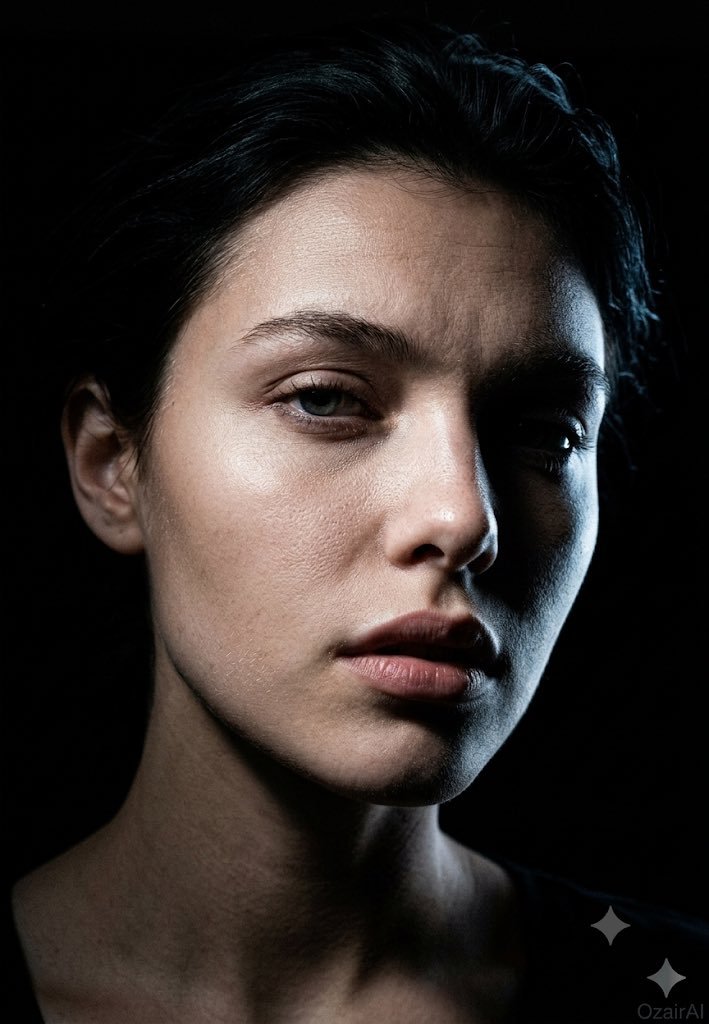
Dark Cinematic Skin Detail Portrait
浏览
79
Camera Control
Using the exact face from the reference image, generate a {argument name="mood" default="dark cinematic skin-detail portrait"} — same concept and mood, entirely new pose and angle. Angle: Precise 45° three-quarter view (not profile, not front-on). Nose cuts into the lit side; near eye fully lit, far eye sliding into shadow. Far cheekbone catches a sliver of light before vanishing into black. Shadow-side jaw fully consumed by darkness, revealing the face's sculptural planes — nose bridge, brow ridge, cheekbone, jaw. Head position: {argument name="head position" default="Chin dropped slightly, eyes lifted toward the lens through the brows"} — heavy-lidded, intense, vulnerable. Brows faintly raised, producing natural forehead lines. Downward tilt sharpens the jaw and elongates the neck. Expression: {argument name="expression" default="Lips parted roughly 3mm"} — a caught breath, not an emotion. Reads as a stolen private moment rather than a pose. Skin detail: Forensic-level texture on new terrain — nose bridge/wing pores in raking light, under-eye thinness from a new angle, lit-side jaw stubble in sharp relief, forehead topography under overhead light, partial lit ear texture. Neck and collarbone edge just entering frame, dissolving into shadow. Lighting: Single hard, narrow overhead-side light creating a surgical beam across the face. Lit side rendered in cold, precise detail; shadow side a total void. Rim light traces the far cheekbone in a thin blue-white line. Near eye: sharp single catchlight. Far eye: only iris edge and rim-lit white visible. Background: Pure black void, silhouette defined entirely by the new angle. Grade: Crushed blacks, cool neutral skin tones with warm undertone tension, blue-white rim light, 10% Ilford HP5 grain. No retouching — full pore and texture detail preserved. Specs: "OzairAI" ghost-cold signature, lower right. Vertical 9:13. Ultra photorealistic, 8K, 150MP skin detail.
这是 Orelon 提示词库里的一条免费 AI 提示词。这里还有成千上万条图像提示词,都能免费复制和改用。
探索更多图像提示词





准备好就开始
从这条精选创作方向开始,在 Orelon 中塑造你的下一张视觉作品。