
UGC / Ad Templates
Dark Anime Prompt Foundry UI
点赞
2
浏览
175
UGC / Ad Templates
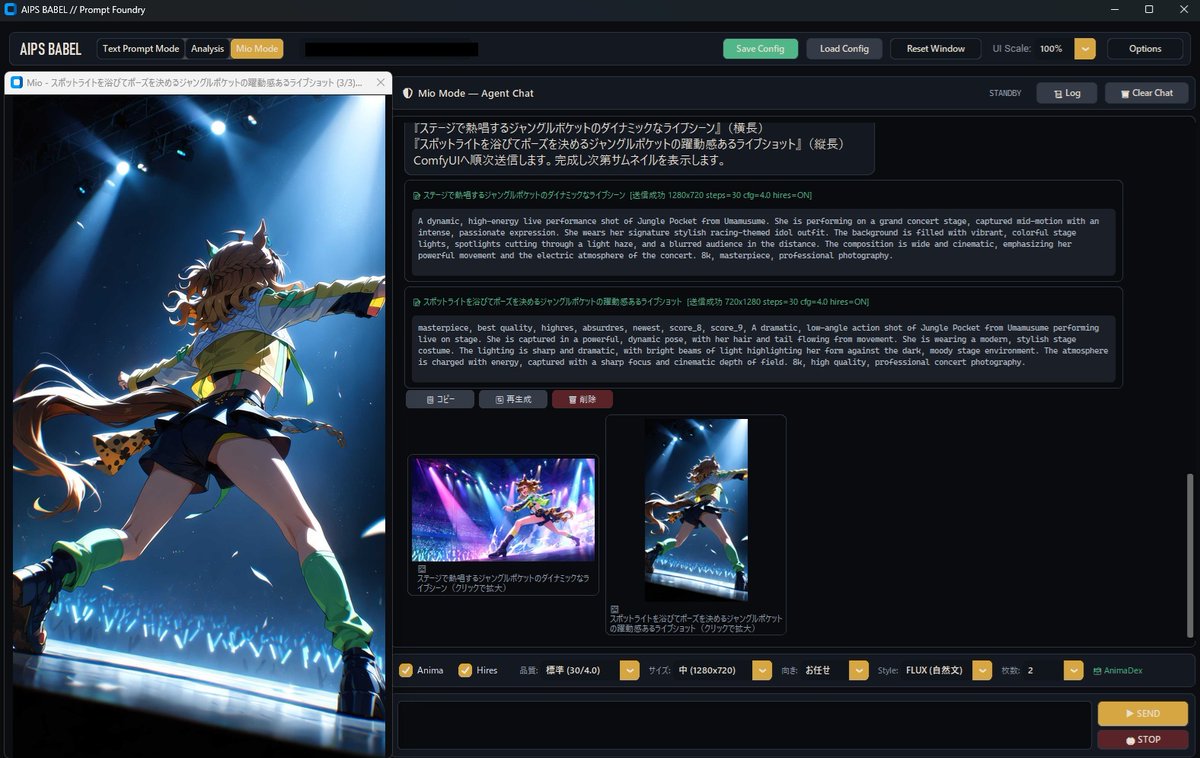
Goal: Create a dark desktop application screenshot for {argument name="app name" default="AIPS BABEL // Prompt Foundry"}, showing an AI image-prompt generation tool with an integrated anime chat assistant and generated image preview. Canvas: 16:9 widescreen desktop window, approximately 1200×760, sharp UI capture style, dark charcoal theme with thin blue-gray borders and gold accent buttons. Include a Windows-style title bar at the very top with minimize, maximize, and close icons. Layout: Split the interface into 2 main columns. The left column is a large image preview panel occupying about one third of the width. The right column is the prompt/chat workspace occupying about two thirds of the width. Add a top navigation strip across the app, a tab strip above the left preview, a chat header above the right workspace, a scrollable message area in the middle, thumbnail previews below the messages, and a control/input bar along the bottom. Top navigation: At the upper left show the app label “AIPS BABEL”. Add exactly 3 mode tabs: “Text Prompt Mode”, “Analysis”, and a highlighted gold “Mio Mode”. In the center/top area include a long black redacted-looking text field. On the right add exactly 5 controls: green “Save Config”, gray “Load Config”, gray “Reset Window”, “UI Scale: 100%” with a small gold dropdown button, and gray “Options”. Left preview panel: Show a tall anime concert illustration filling nearly the full left pane. The subject is {argument name="character description" default="a dynamic anime horse-girl idol with brown twin-tail hair, animal ears, long tail, racing-idol outfit, shorts, gloves, and green leg warmers"}. She is viewed from a dramatic low angle from behind/side, mid-performance with one arm extended, standing on a glossy stage edge under intense blue-white spotlights. The background contains a dark concert venue with blue glow sticks and particles/confetti. The image should look like high-quality anime key art with cinematic lighting. Above the preview, include a browser-like tab title in Japanese: “Mio - スポットライトを浴びてポーズを決めるジャングルポケットの躍動感あるライブショット (3/3)...” with a small close button. Right workspace header: Title the panel “Mio Mode — Agent Chat”. On the far right show status “STANDBY” and exactly 2 buttons: “Log” and “Clear Chat”. Message area: Use a dark scrollable chat panel with Japanese prompt text at the top, followed by exactly 2 large prompt cards with green Japanese titles and monospaced English prompt bodies. The first card should describe a dynamic high-energy live performance shot of Jungle Pocket from Uma Musume on a grand concert stage, wide cinematic composition, intense colorful lights, spotlight cutting through haze, blurred audience, professional photography. The second card should be the selected/final version and include quality tags such as “masterpiece, best quality, highres, absurdres, newest, score_8, score_9” and a low-angle live-on-stage action shot. Under the prompt cards place exactly 3 small action buttons labeled in Japanese: “コピー”, “再生成”, and a red “削除”. Thumbnail section: Beneath the chat cards show exactly 2 generated thumbnail cards. The left thumbnail is a wide concert-stage anime image with magenta and blue lights; the right thumbnail is a vertical crop matching the large left preview. Each thumbnail has a Japanese caption underneath; the left begins with “ステージで躍動するジャングルポケットのダイナミックなライ...” and the right begins with “スポットライトを浴びてポーズを決めるジャングルポケット...”. Bottom controls: Create one horizontal settings bar with exactly 8 visible controls: checked “Anima”, checked “Hires”, quality label “品質: 標準 (30/4.0)” with a gold dropdown, size label “サイズ: 中 (1280×720)” with a gold dropdown, orientation label “向き: お任せ” with a gold dropdown, style label “Style: FLUX (自然文)” with a gold dropdown, count label “枚数: 2” with a gold dropdown, and a small green “AnimaDex” label. Below it, include a long empty black input box and on the right exactly 2 stacked buttons: gold “SEND” and red “STOP”. Visual style: Realistic app mockup/screenshot, crisp text where possible, dark futuristic UI, subtle shadows, thin outlines, compact spacing, gold highlights for selected controls, green accents for active states. Keep the anime preview vibrant and luminous, contrasting with the dark interface. Constraints: Include no extra panels beyond the described layout. Preserve the visible mix of English UI labels and Japanese prompt labels. The interface should look like a local ComfyUI-style prompt foundry tool rather than a website.
这是 Orelon 提示词库里的一条免费 AI 提示词。这里还有成千上万条图像提示词,都能免费复制和改用。
探索更多图像提示词





准备好就开始
从这条精选创作方向开始,在 Orelon 中塑造你的下一张视觉作品。