
Shanghai Night Travel Journal
Generates a dreamy handwritten travel-note style Shanghai skyline image for social media travel posts.
点赞
405
浏览
6.2万
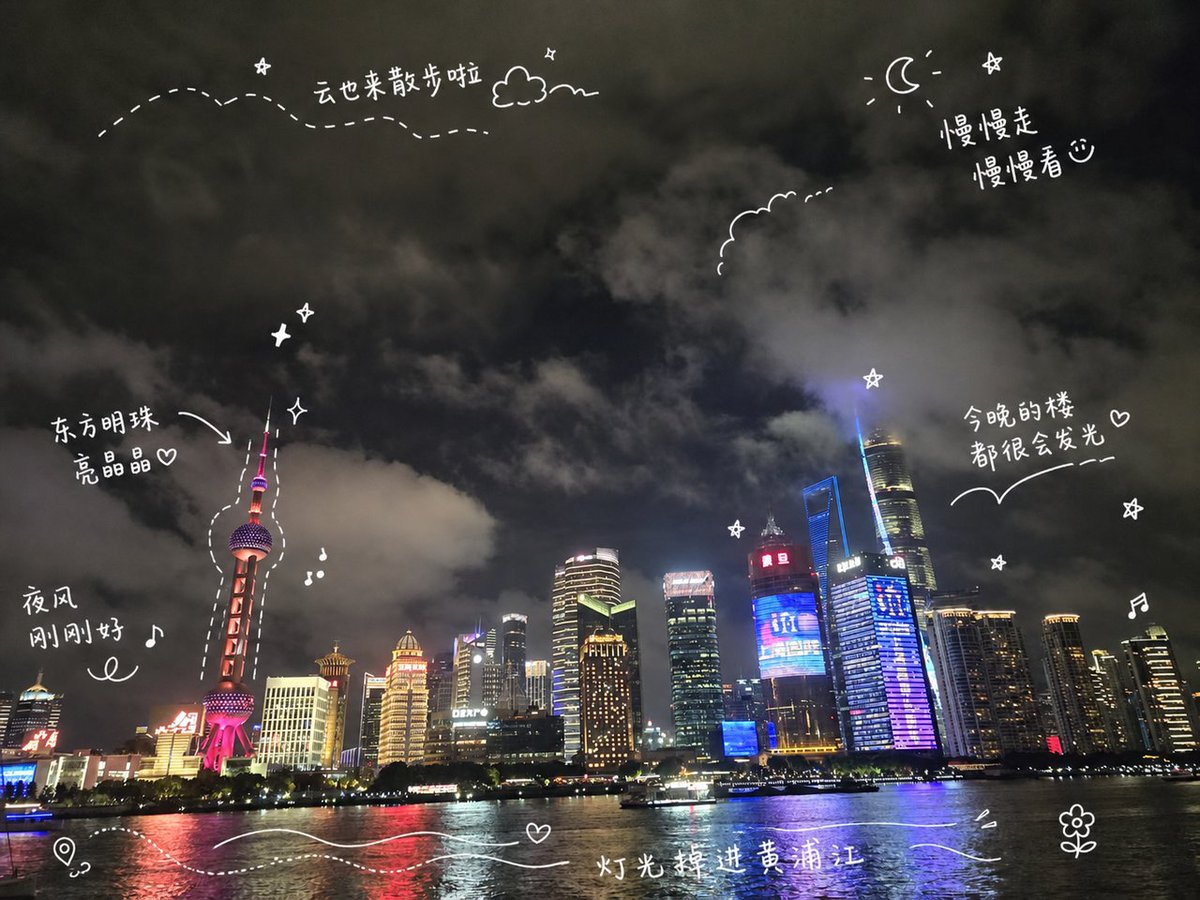
Generates a dreamy handwritten travel-note style Shanghai skyline image for social media travel posts.
Create a travel-journal style night cityscape poster of {argument name="city skyline" default="Shanghai Pudong skyline along the Huangpu River"}. Use a wide 4:3 canvas showing a realistic nighttime waterfront photo look: dark cloudy sky filling the top two thirds, illuminated skyscrapers along the horizon, the Oriental Pearl Tower on the left glowing pink-red, Shanghai Tower and other high-rises on the right with blue, purple, gold, and white lights, and reflective river water across the bottom with a small sightseeing boat. Add playful white hand-drawn diary doodles and handwritten Chinese annotations directly over the scene, like a social media travel note. Include exactly 6 handwritten text notes: “云也来散步啦” near the upper left with a dotted wandering path and small cloud, “慢慢走 慢慢看♡” near the upper right beside a crescent moon and star, “东方明珠 亮晶晶♡” pointing with an arrow to the Oriental Pearl Tower, “夜风 刚刚好♪” on the left above the river, “今晚的楼 都很会发光♡” on the right above the skyline with a curved underline, and “灯光掉进黄浦江” centered near the bottom over the water. Include exactly 15 white doodle elements: a dotted flight path across the upper left, one small outlined cloud near the top, one crescent moon at the upper right, one scalloped cloud outline near the upper center-right, one arrow pointing to the Oriental Pearl Tower, one dashed outline tracing around the Oriental Pearl Tower, three small sparkle/star icons, two music-note icons, one map-pin icon at the bottom left, two flowing wave lines across the bottom water, and one small flower doodle at the bottom right. Keep all doodles thin, casual, hand-drawn, slightly imperfect, and bright white, with no borders or watermark. The mood should be dreamy, cozy, romantic, and spontaneous, like a handwritten travel memory shared on social media.
这是 Orelon 提示词库里的一条免费 AI 提示词。这里还有成千上万条图像提示词,都能免费复制和改用。
探索更多图像提示词



准备好就开始
从这条精选创作方向开始,在 Orelon 中塑造你的下一张视觉作品。