
Effects by Tags
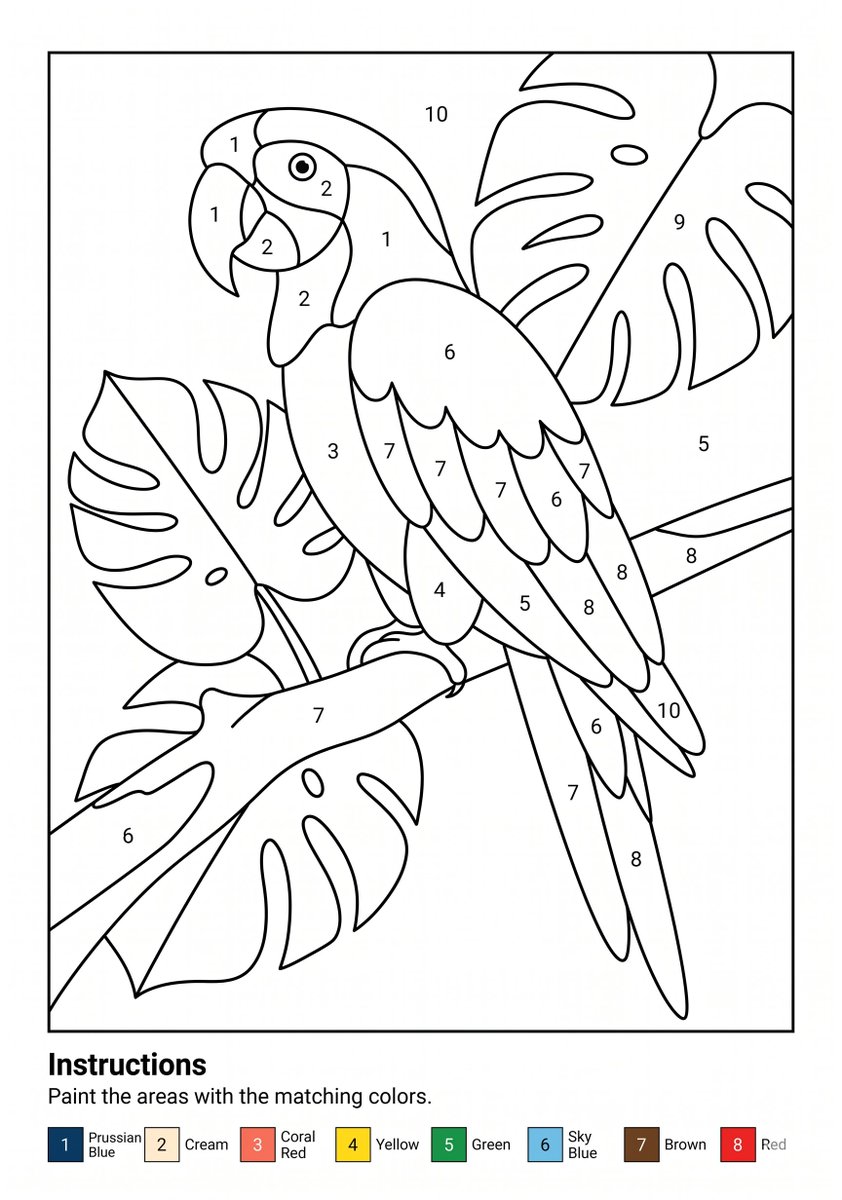
Parrot Paint-by-Numbers Worksheet
点赞
1
浏览
12
Effects by Tags
Goal: Create a printable paint-by-numbers worksheet featuring {argument name="subject" default="a tropical parrot perched among large monstera leaves"}. Canvas: A4 portrait page, clean white background, black-and-white line art, designed for printing at 300 DPI. Add a thin rectangular border around the main artwork, leaving a bottom instruction area. Main artwork: Inside the bordered frame, draw one large parrot in simple coloring-book style, facing left, perched diagonally on a branch. The parrot has a curved beak, round eye, layered wing feathers, long tail feathers, and visible feet gripping the branch. Surround it with large tropical monstera leaves in the background and foreground, with broad split-leaf shapes and simple vein lines. Use smooth, thick, consistent black outlines and no shading or grayscale fills. Numbered paint regions: Divide the illustration into many enclosed paint regions and place centered black numbers in the regions. Use exactly 10 numbered region labels across the artwork, numbered 1 through 10, with repeated numbers appearing in multiple areas. Make the labels small, clean, and readable, like a printable worksheet. Bottom instruction area: Below the artwork, add the bold heading "Instructions" aligned left, followed by the sentence "Paint the areas with the matching colors." Under the sentence, include a horizontal color legend with exactly 8 numbered color swatches: 1 Prussian Blue, 2 Cream, 3 Coral Red, 4 Yellow, 5 Green, 6 Sky Blue, 7 Brown, 8 Red. Each legend item should show a small colored square with the number inside or beside it, followed by the color name. Visual style: Minimal vector worksheet aesthetic, crisp black outlines, white fill areas, no texture, no shadows, no watermark, no extra decorative elements. The final image should look like a ready-to-print kids’ paint-by-numbers coloring page.
这是 Orelon 提示词库里的一条免费 AI 提示词。这里还有成千上万条图像提示词,都能免费复制和改用。
探索更多图像提示词





准备好就开始
从这条精选创作方向开始,在 Orelon 中塑造你的下一张视觉作品。